Bot Configuration
Complete guide to configuring your Telegram bot settings, messages, and automation rules for optimal subscription management.
On this page
Bot Configuration Overview
The Bot Configuration section allows you to customize how your Telegram bot interacts with users, handles payments, and manages subscriptions. Proper configuration is essential for smooth user experience and automated operations.
Before You Start
Make sure your Telegram bot is properly connected and has the necessary permissions. You'll need admin access to the bot and your subscription channels.
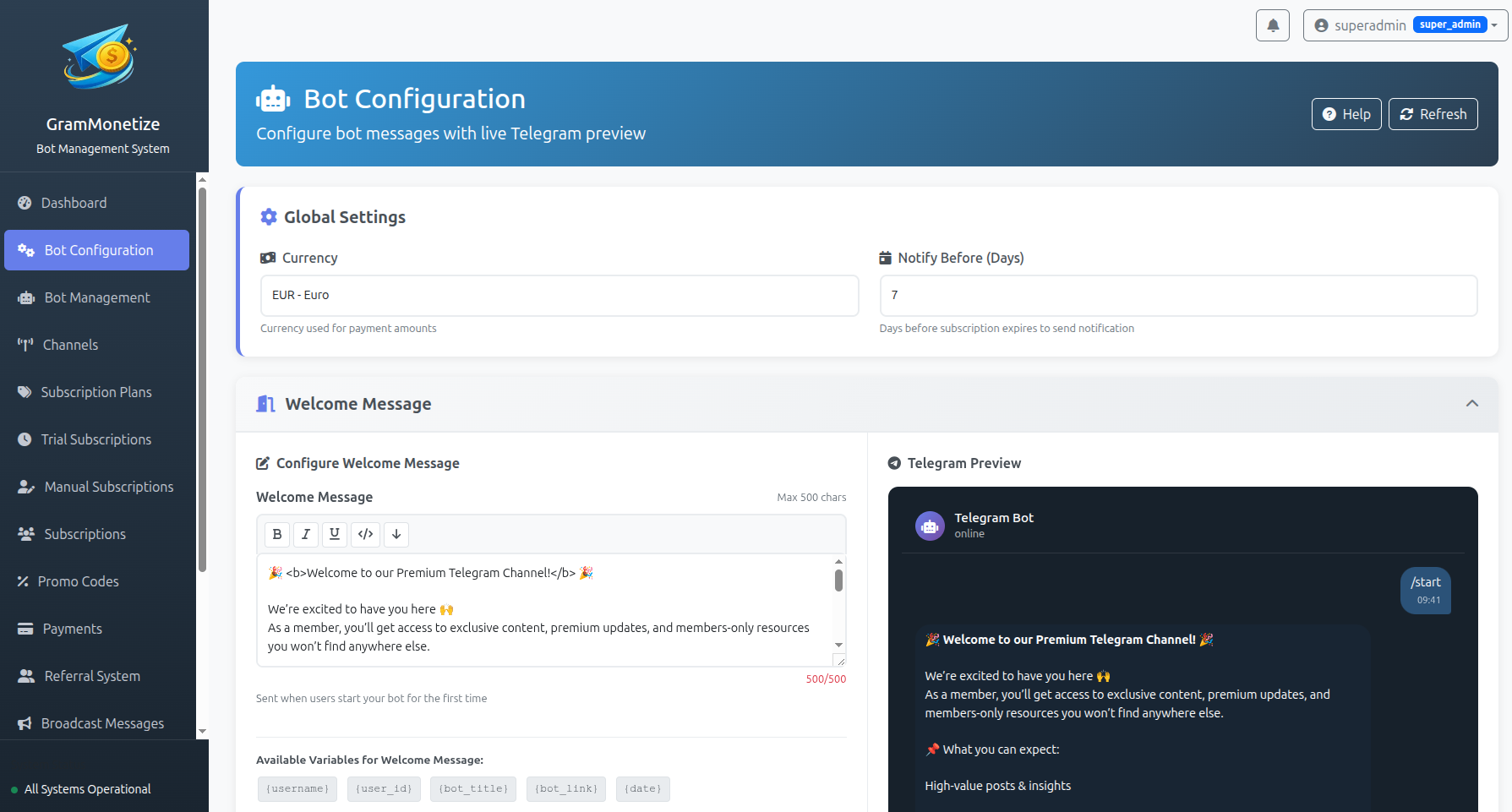
Currency Settings
Configure the currency for all subscription payments and pricing displays.
Supported Currencies
GramMonetize supports all major currencies. Choose one that matches your target audience's preferences:
Popular Currencies:
- USD ($) - United States Dollar (Recommended for international)
- EUR (€) - Euro (European Union)
- GBP (£) - British Pound
- CAD ($) - Canadian Dollar
- AUD ($) - Australian Dollar
Other Supported Currencies:
- INR (₹) - Indian Rupee
- JPY (¥) - Japanese Yen
- CNY (¥) - Chinese Yuan
- RUB (₽) - Russian Ruble
- BRL (R$) - Brazilian Real
Important Notes
- Currency can only be changed before accepting payments
- Existing subscriptions will maintain their original currency
- Payment gateways may charge conversion fees
- Choose a currency supported by your payment providers
How to Set Currency
Access Currency Settings
Navigate to Bot Configuration → Currency Settings in your dashboard.
Select Your Currency
Choose from the dropdown list of supported currencies.
// Example currency configuration
{
    "currency": "USD",
    "symbol": "$",
    "code": "USD",
    "decimal_places": 2,
    "thousands_separator": ",",
    "decimal_separator": "."
}
Save Changes
Click Save Settings and confirm the change.
Notification Settings
Configure automated notifications to keep users informed about their subscription status.
Notify User Before X Days
Send automatic reminders to users before their subscription expires.
Recommended Settings:
- 3 days before - First reminder (Recommended)
- 1 day before - Final reminder
- Day of expiry - Last chance notification
Best Practices:
- Send first reminder 3-7 days before expiry
- Follow up 24 hours before expiry
- Consider timezone differences
- Include renewal instructions
Notify Message Text
Customize the notification message that users receive before subscription expiry.
Message Variables Available:
| Variable | Description | Example Output |
|---|---|---|
{username} |
User's Telegram username | @john_doe |
{plan_name} |
Subscription plan name | Premium Plan |
{expiry_date} |
Subscription expiry date | 2024-02-15 |
{days_left} |
Days remaining | 3 |
{renew_link} |
Auto-renewal link | https://t.me/yourbot?start=renew |
Example Notification Message:
Hi {username}!

Your {plan_name} subscription expires in {days_left} days (on {expiry_date}).

To continue accessing premium content, please renew your subscription:
{renew_link}

Thank you for being a valued member! 😊
Message Templates
Customize all automated messages sent by your bot for a personalized user experience.
Welcome Message
Sent when users first start or interact with your bot.
Purpose:
- Introduce your bot/service
- Explain available commands
- Set user expectations
- Provide help/contact information
Example Template:
I'm your assistant for managing subscriptions to our premium Telegram channels.
Available Commands:
• /subscribe - View available plans
• /myaccount - Check your subscription
• /help - Get assistance
Need help? Contact: @support_username
Disclaimer Message
Shown after successful subscription payment along with channel invitation link.
Include in Disclaimer:
- Channel rules and guidelines
- What to expect in the channel
- How to get support
- Invitation link to join channel
Example Template:
Important:
• No sharing of paid content
• Respect community guidelines
• Contact @support for issues
Join Channel:
👉 https://t.me/yourchannel
Your access starts now! Enjoy 😊
Subscription Message
Shown if Disclaimer is not set or as an alternative message.
When to Use:
- When disclaimer is disabled
- For simplified confirmation
- Quick access information
Example Template:
Your subscription to [Plan Name] is now active.
Duration: [Period]
Expires: [Date]
Channel Access:
https://t.me/yourchannel
Need help? Reply to this message!
Manual Payment Instructions
Shown when users choose to pay manually (bank transfer, crypto, etc.).
Essential Information:
- Payment methods accepted
- Account/address details
- Reference/note requirements
- Confirmation process
Example Template:
Bank Transfer:
Bank: [Bank Name]
Account: [Account Number]
Name: [Account Name]
Reference:
Use: [Your Telegram Username]
After Payment:
Send receipt to @admin_username
Access activated within 24 hours.
Message Template Tips
- Use emojis for better visual appeal
- Keep messages concise but informative
- Include clear call-to-action
- Test messages before going live
- Update templates periodically
Contact Configuration
Set up contact information for users to reach support or administration.
Contact Link Configuration
Telegram Contact:
Example Usage:
Contact our support team:
👉 https://t.me/GramMonetizeHelp
Response time: 2-4 hours
Website Contact:
Best Practices:
- Provide at least one contact method
- Set realistic response time expectations
- Consider timezone differences
- Have backup contact methods
- Monitor all contact channels regularly
Contact Message Template:
// Contact information variables
{
    "telegram_support": "@GramMonetizeHelp",
    "telegram_link": "https://t.me/GramMonetizeHelp",
    "website_contact": "https://grammonetize.com/contact",
    "email": "support@grammonetize.com",
    "response_time": "2-4 hours",
    "working_hours": "9AM-6PM UTC"
}
Bot Information
Configure additional bot links and information shown in the start menu.
Additional Bot Links
Display links to other related bots or services in your bot's start menu.
Common Use Cases:
- Link to support bot
- Link to community/group bot
- Link to related service bots
- Link to announcement channels
- Link to referral/invite bot
Configuration Format:
// Bot information configuration
{
    "additional_bots": [
        {
            "name": "Support Bot",
            "username": "@SupportBot",
            "link": "https://t.me/SupportBot",
            "description": "Get help and support"
        },
        {
            "name": "Community",
            "username": "@CommunityGroup",
            "link": "https://t.me/CommunityGroup",
            "description": "Join our community"
        }
    ]
}
Example Start Menu Display:
Subscription Management Bot
• /start - Show this menu
• /subscribe - View plans
• /myaccount - Check status
• /help - Get assistance
• @SupportBot - Get help and support
• @CommunityGroup - Join our community
Benefits of Additional Bot Links
- Cross-promote your services
- Reduce support load on main bot
- Build community engagement
- Increase user retention
- Provide specialized assistance
Best Practices
Configuration Checklist
Common Mistakes to Avoid
- Generic Messages: Avoid template-like messages; personalize
- No Contact Info: Always provide support contact
- Complex Instructions: Keep manual payment steps simple
- No Disclaimer: Protect yourself with clear terms
- Late Notifications: Send reminders with enough lead time
- Currency Mismatch: Ensure currency matches payment methods
- Broken Links: Regularly test all configured links
Pro Configuration Tips
📱 Mobile Optimization
- Keep messages concise for mobile
- Use mobile-friendly formatting
- Test on Telegram mobile app
🌍 International Users
- Consider timezone differences
- Support multiple currencies
- Use universal emojis
⚡ Performance
- Use variables efficiently
- Cache message templates
- Monitor bot response times
Frequently Asked Questions
- Export all existing subscription data
- Refund or complete all active subscriptions
- Change the currency setting
- Create new subscription plans in the new currency
- 7 days before: Early reminder (optional)
- 3 days before: Main reminder (highest conversion)
- 1 day before: Urgent reminder
- Day of expiry: Final chance notification
- Subscription duration (shorter = more frequent reminders)
- User engagement levels
- Renewal difficulty (manual vs automatic)
- Your audience's timezone
| Template | Required | Recommended |
|---|---|---|
| Welcome Message | ✅ Yes | ✅ Essential |
| Disclaimer Message | ❌ No | ✅ Highly Recommended |
| Subscription Message | ❌ No | ✅ If no Disclaimer |
| Manual Payment Instructions | ❌ No | ✅ If offering manual payments |
*bold text*or__bold text___italic text_or*italic text*`inline code`[inline URL](http://www.example.com/)[inline mention of a user](tg://user?id=123456)
- Primary (1): Main support/help bot
- Secondary (2): Community/group link
- Tertiary (3): Related service or announcement channel
- Enable Test Mode in Bot Configuration
- Use test payment credentials
- Send test messages to your own account
- Verify all automated flows work correctly
- Disable Test Mode when ready for production
- Users cannot contact you for support
- Payment issues may go unresolved
- Subscription problems may lead to chargebacks
- User satisfaction decreases significantly
- Platform may flag your account for poor support
Need More Help?
Visit our Bot Management documentation for advanced configuration or contact support for personalized assistance.
Was this documentation helpful?
Your feedback helps us improve the documentation.