Promo Code Management
Complete guide to creating and managing promotional discount codes. Set percentage discounts, usage limits, expiry dates, and assign codes to specific plans or make them global. Track validation, usage, and remaining uses in real-time.
On this page
Promo Code Overview
Promo codes are a powerful marketing tool to attract new subscribers, retain existing customers, and run seasonal promotions. GramMonetize's promo code system gives you full control over discount percentages, usage limits, expiry dates, and plan assignments.
12
Active Codes
8
Global Codes
347
Total Uses
$2,450
Discounts Given
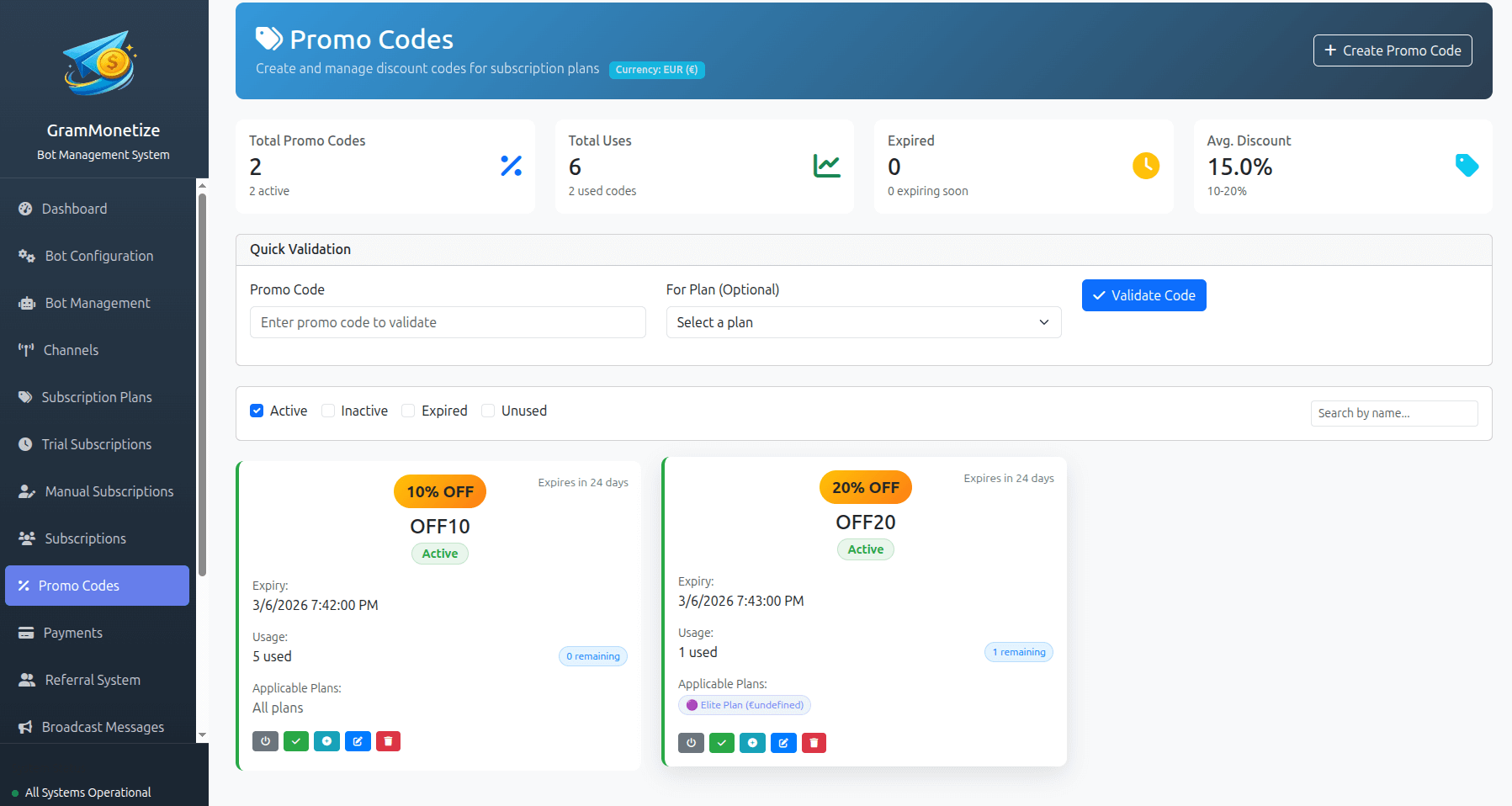
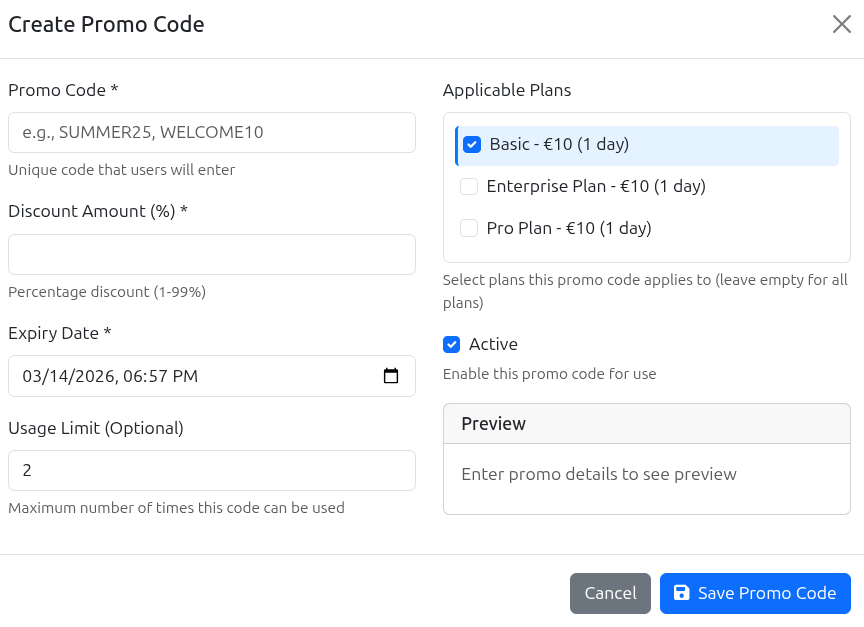
Creating Promo Codes
Create percentage-based discount codes in seconds. Choose between global codes that work on all plans or restrict them to specific subscription plans.
Usage Limits & Expiry
Control exactly how your promo codes are used with flexible limit settings. Track usage in real-time and see remaining uses at a glance.
Limited Uses
Set a maximum number of redemptions. Perfect for:
- Influencer campaigns (50-500 uses)
- Early bird specials (first 100 customers)
- Exclusive partner promotions
- Limited-time flash sales
Unlimited Usage
No redemption cap. Perfect for:
- Public welcome offers
- Email newsletter signups
- Social media promotions
- Affiliate programs
Fixed Expiry Date
Code expires on a specific date regardless of when it was created.
Best for: Seasonal campaigns, holiday sales, events
No Expiry
Code never expires (still respects usage limits if set).
Best for: Evergreen affiliate codes, loyalty rewards
✓ Code is valid
20% OFF Global 45/100 uses Expires Dec 31, 2024
Managing Promo Codes
Easily manage all your promo codes from a single dashboard. Activate, deactivate, edit, or delete codes as needed. Deactivated codes can be reactivated later without losing their settings.
All Promo Codes
|
|
Promo Code | Discount | Scope | Usage | Expiry | Status | Actions |
|---|---|---|---|---|---|---|---|
|
|
SUMMER2024 Created: Jun 1, 2024 | 20% OFF | Global |
45
/
100
|
Dec 31, 2024 318 days left | Active |
|
|
|
WELCOME10 Created: Jan 1, 2024 | 10% OFF | Global |
1,247
/
∞
Unlimited
|
No Expiry | Active |
|
|
|
FLASH20 Created: Feb 10, 2024 | 20% OFF | Premium |
50
/
50
|
Feb 20, 2024 Expired | Depleted |
|
|
|
TEST2024 Created: Jan 15, 2024 | 15% OFF | Global | 0 / 50 | Dec 31, 2024 | Deactivated |
|
Deactivate & Reactivate Anytime
Deactivate a Promo Code
When you deactivate a code:
- Code immediately stops working
- No new redemptions allowed
- Existing usage data is preserved
- All settings are saved
Reactivate a Promo Code
When you reactivate a code:
- Code becomes active again instantly
- Original usage limits and expiry apply
- Previous usage count continues
- No need to recreate the code
Are you sure you want to delete this promo code?
FLASH20 - 20% OFF · 50/50 used · Expired Feb 20, 2024
Best Practices
Code Naming Conventions
- Use UPPERCASE for readability
- Include campaign/year (SUMMER2024)
- Add discount amount (SAVE20, WELCOME10)
- Avoid ambiguous characters (0 vs O, 1 vs I)
Discount Strategy
- 10-20% for welcome offers
- 20-30% for seasonal sales
- 30-50% for clearance/retention
- Test different percentages
Usage Limit Tips
- Set limits slightly higher than expected
- Use unlimited for evergreen offers
- Monitor usage daily during campaigns
- Extend limits if campaign is successful
What to Avoid
- Generic codes like "SAVE" or "DISCOUNT"
- Setting expiry too close to launch
- Forgetting to deactivate test codes
- Deleting codes with active usage history
Promo Campaign Calendar
New Year
20% OFF CODE: NEWYEAR20Spring Sale
25% OFF CODE: SPRING25Summer
20% OFF CODE: SUMMER2024Black Friday
30% OFF CODE: BLACKFRIDAYPromo Code Analytics
Track the performance of your promotional campaigns. See which codes are driving the most conversions and calculate ROI.
Code Usage Over Time
Top Performing Codes
-
WELCOME10 10% OFF1,247 uses
-
SUMMER2024 20% OFF45 uses
-
FRIENDS20 20% OFF32 uses
-
BLACKFRIDAY 30% OFF28 uses
347
Total Redemptions
+28% vs last month$2,450
Total Discounts
Avg $7.06 per use$12,850
Revenue Generated
5.2x ROI23%
Conversion Rate
+5% vs no codeExport Promo Code Report
Download detailed usage report for all promo codes
Frequently Asked Questions
Global Codes
Works on all active subscription plans. Perfect for:
- Welcome offers
- Holiday sales
- Site-wide promotions
Specific Plan Codes
Works only on selected plans. Perfect for:
- Upselling premium plans
- Testing new pricing
- Partner promotions
Yes! This is a key feature. Deactivating a code:
- Instantly stops the code from working
- Preserves all settings and usage history
- Allows you to reactivate later with one click
- Perfect for pausing campaigns or testing
To deactivate: Click the Pause button on any active code. To reactivate: Click the Play button on a deactivated code.
You can validate any promo code instantly using the Promo Code Validator tool:
- Go to Promo Code → Validator
- Enter the promo code
- Click Validate
The validator will check:
- ✓ If the code exists
- ✓ If it's active (not deactivated)
- ✓ If it hasn't expired
- ✓ If usage limit hasn't been reached
- ✓ Remaining uses count
This is the same validation system used during checkout.
You can edit the following fields after creation:
- ✓ Description (internal notes)
- ✓ Usage limit (increase only)
- ✓ Expiry date (extend only)
- ✓ Status (activate/deactivate)
For security reasons, you cannot edit:
- ✗ The promo code itself
- ✗ Discount percentage
- ✗ Plan scope (global vs specific)
If you need to change these, create a new promo code and deactivate the old one.
When a promo code reaches its maximum usage limit:
- The code automatically stops working
- Users can no longer apply it at checkout
- The status changes to Depleted
- You receive a notification (if enabled)
You can still:
- Increase the usage limit to allow more redemptions
- Deactivate the code to archive it
- Delete the code (if no longer needed)
Yes! Click the View Usage button (graph icon) next to any promo code to see detailed usage history including:
- Username and Telegram ID
- Date and time of redemption
- Plan purchased
- Original price and discounted price
- Order ID
This data can also be exported for further analysis.
By default, promo codes cannot be stacked - users can only apply one code per subscription. However, you can enable stacking per code:
- Create or edit a promo code
- Toggle on "Stackable" option
- Save the code
When stacking is enabled, users can combine multiple stackable codes. Discounts are applied sequentially, not compounded.
Related Documentation
Was this documentation helpful?
Your feedback helps us improve the documentation.