Bot Management
Comprehensive guide to managing multiple Telegram bots, monitoring their status, and handling bot operations from a single dashboard.
On this page
Bot Management Overview
The Bot Management system allows you to control multiple Telegram bots from a single interface, providing centralized monitoring, control, and analytics for all your subscription bots.
Multiple Bots
Add and manage unlimited Telegram bots with different tokens and configurations.
Centralized Control
Start, stop, and monitor all bots from a single dashboard with real-time status updates.
Shared Database
All bots share the same database, ensuring consistent user data and subscription management.
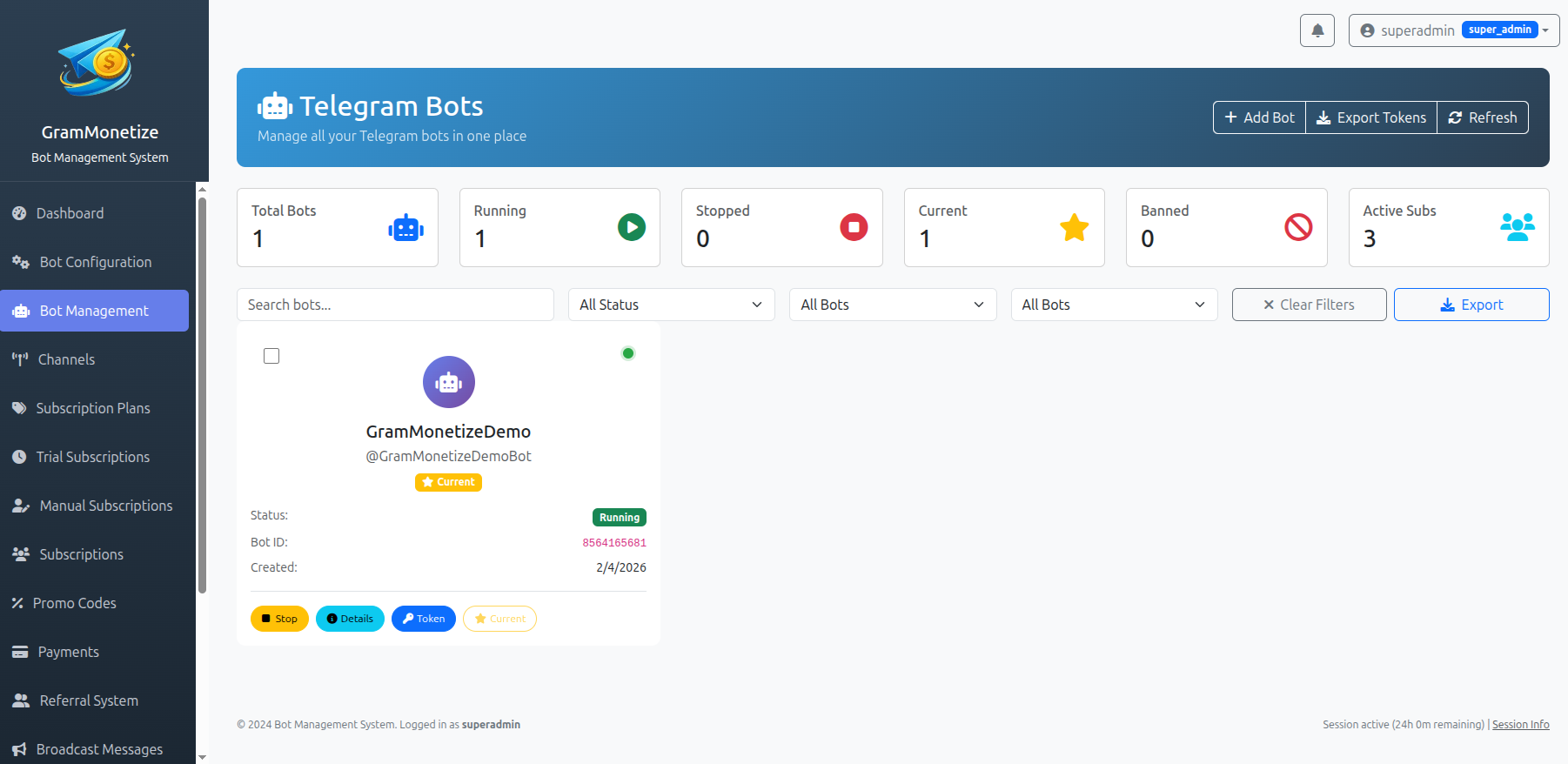
Adding Telegram Bots
Add one or more Telegram bots by simply providing the bot token obtained from @BotFather.
Step-by-Step: Adding a New Bot
1. Get Bot Token from @BotFather
On Telegram, message @BotFather and create a new bot or get token of existing bot:
/newbot
→ Choose bot name (e.g., MySubscriptionBot)
→ Choose username (e.g., MySubscriptionBot)
→ Get token: 1234567890:ABCdefGHIjklMNOpqrsTUVwxyZ2. Add Bot to Dashboard
In your GramMonetize dashboard, navigate to Bot Management → Add New Bot:
Required Information:
- Bot Token: From @BotFather
- Bot Name: Display name (optional)
- Bot Username: @username (auto-detected)
Example Token Format:
1234567890:ABCdefGHIjklMNOpqrsTUVwxyZ
Format: BotID:BotSecret
3. Configure Webhook (Automatic)
GramMonetize automatically sets up the webhook for your bot. The system will:
- Verify bot token validity
- Set webhook to your server URL
- Configure allowed updates
- Test connection with Telegram API
Multiple Bot Configuration
You can add multiple bots for different purposes:
🌐 Primary Bot
Main subscription bot for all users
@MainSubscriptionBot
🛠️ Support Bot
Dedicated support and assistance
@SupportHelperBot
📢 Announcement Bot
Broadcasts and announcements
@AnnouncementsBot
Multi-Bot Architecture
GramMonetize supports running multiple bots simultaneously with a shared database architecture.
Shared Database Architecture
Benefits of Shared Database:
- Unified User Management: Users interact with any bot, data syncs across all
- Consistent Subscriptions: Subscription status consistent across bots
- Centralized Analytics: All bot activity in one place
- Simplified Backups: Single database to backup
- Load Distribution: Multiple bots handle user load
- Redundancy: If one bot fails, others continue
- Specialization: Different bots for different purposes
- Scalability: Add more bots as user base grows
Configuration Example:
// Multi-bot configuration
$bots = [
    'main_bot' => [
        'token' => '1234567890:ABCdefGHIjklMNOpqrsTUVwxyZ',
        'purpose' => 'Primary subscriptions',
        'webhook_url' => 'https://yourdomain.com/webhook/main',
        'status' => 'running'
    ],
    'support_bot' => [
        'token' => '9876543210:ZYXwvutsrqpoNMLkjihGFEdcba',
        'purpose' => 'Customer support',
        'webhook_url' => 'https://yourdomain.com/webhook/support',
        'status' => 'running'
    ]
];

// All bots connect to same database
$database = 'grammonetize_db';
// Shared user table
$users_table = 'bot_users';
// Shared subscriptions table
$subscriptions_table = 'user_subscriptions';
Status Monitoring
Monitor all your bots' status in real-time with comprehensive metrics and alerts.
Bot Status Dashboard
Status Indicators:
| Status | Icon | Description | Action Required |
|---|---|---|---|
| Running | Bot is active and processing messages | None | |
| Stopped | Bot is manually stopped | Start bot to resume | |
| Error | Bot has connection issues | Check token/webhook | |
| Banned | Bot banned by Telegram | Replace token immediately | |
| Active Link | Bot link shown on homepage | Only one bot can be active |
Active Bot Link on Homepage
You can set one bot as the "active bot" whose link will be displayed on your dashboard homepage:
https://t.me/MySubscriptionBot
Users can click this link to start interacting with your bot directly from your website.
Bot Operations
Control your bots with simple operations from the dashboard interface.
Start and Stop Individual Bot
Starting a Bot:
- Navigate to Bot Management page
- Find the bot you want to start
- Click the button
- Confirm the action in the popup
- Wait for status to change to "Running"
Stopping a Bot:
- Navigate to Bot Management page
- Find the running bot
- Click the button
- Confirm the action in the popup
- Status changes to "Stopped"
Bulk Operations
Perform actions on multiple bots simultaneously to save time.
Bulk Selection Process:
1. Select Multiple Bots
Use the checkboxes next to each bot in the list:
2. Choose Bulk Action
Select an action from the bulk actions dropdown:
3. Confirm Action
A confirmation dialog shows the affected bots:
Confirm Bulk Action
You are about to start 2 bots:
- @SupportBot (Currently: Stopped)
- @AnnounceBot (Currently: Running)
Available Bulk Actions:
Token Management
Securely manage and replace bot tokens when needed without losing data.
Token Replacement
When to Replace Token
- Bot banned by Telegram
- Suspected token compromise
- Changing bot username
- Security rotation policy
Step-by-Step Token Replacement:
1. Get New Token from @BotFather
Message @BotFather and use command:
/mybots
→ Select your bot
→ API Token
→ Revoke current token
→ Generate new token
2. Replace Token in Dashboard
In Bot Management, click "Replace Token" for the bot:
Before Replacement:
1234567890:OLD_TOKEN_abc123
Old token (inactive)
After Replacement:
1234567890:NEW_TOKEN_xyz789
New token (active)
3. Data Preservation
All existing data is preserved during token replacement:
- ✅ User Data: All user records remain
- ✅ Subscriptions: Active subscriptions continue
- ✅ Settings: Bot configuration preserved
- ✅ Analytics: Historical data maintained
- ✅ Webhook: Automatically reconfigured
Security Best Practices:
Regular Rotation
Rotate tokens every 90 days for security
Access Control
Limit token access to authorized admins only
Audit Logs
Maintain logs of all token changes
Best Practices
Multi-Bot Strategy
- Primary Bot: Main subscription processing
- Support Bot: Dedicated to user queries
- Backup Bot: Ready in case primary fails
- Testing Bot: For testing new features
- Regional Bots: For different languages/regions
Common Mistakes
- Using same token in multiple places
- Not monitoring bot status regularly
- Forgetting to set active bot link
- Not having backup bots ready
- Ignoring ban warnings from Telegram
- Exposing tokens in logs or errors
- Not testing after token replacement
Performance Optimization
📊 Monitoring
- Check status daily
- Monitor response times
- Track error rates
- Set up alerts for downtime
🛡️ Security
- Regular token rotation
- IP whitelisting if possible
- Monitor unauthorized access
- Keep logs of all changes
⚡ Scalability
- Add bots before reaching limits
- Distribute load across bots
- Monitor Telegram API limits
- Plan for growth
Troubleshooting
Common Issues and Solutions
| Issue | Symptoms | Solution |
|---|---|---|
| Bot Not Starting | Status remains "Stopped" |
|
| Bot Banned | Status shows "Banned" |
|
| Slow Response | High response times |
|
| Webhook Errors | Intermittent connectivity |
|
Quick Diagnostic Commands:
// Check bot info via Telegram API
https://api.telegram.org/bot<YOUR_TOKEN>/getMe

// Check webhook status
https://api.telegram.org/bot<YOUR_TOKEN>/getWebhookInfo

// Set webhook manually
https://api.telegram.org/bot<YOUR_TOKEN>/setWebhook?url=<YOUR_WEBHOOK_URL>
Need More Help?
Check our general troubleshooting guide or contact support with your bot token (first 10 characters only) and error screenshots.
Frequently Asked Questions
- Server Resources: Each bot consumes server resources
- Management Overhead: More bots require more management
- Telegram Limits: Each bot has its own API rate limits
- Database Performance: Shared database must handle all bot activity
Recommended: Start with 1-3 bots and add more as needed based on user load and business requirements.
- Different Messages: Welcome, disclaimer, support messages
- Different Payment Methods: Some bots can accept different payment options
- Different Channels: Bots can manage different Telegram channels
- Different Languages: Bots can be configured for different languages
However, all bots share the same core settings like currency, database connection, and user management system. You can create specialized bots for different purposes while maintaining a unified backend.
- Immediate Detection: GramMonetize detects the ban status automatically
- Status Update: Bot status changes to "Banned" in dashboard
- Notifications: You receive email/Telegram notifications
- Data Preservation: All user data and subscriptions remain intact
- Quick Recovery: Replace token to restore functionality
- Single Active Bot: Only one bot can be set as "active" at a time
- Homepage Display: Active bot's link appears on your dashboard homepage
- Quick Access: Users can click to start conversation with the bot
- Easy Switching: Change active bot anytime without affecting data
Use Case: Useful when you have multiple bots but want to direct users to your primary subscription bot. The link format is: https://t.me/YourBotUsername
- JSON Export: Complete bot configuration including token (encrypted)
- CSV Report: Bot statistics and performance metrics
- Backup File: Full backup for disaster recovery
- Migration Package: For moving to another GramMonetize instance
Export Options:
Security Note: Exported files containing tokens are encrypted and should be stored securely.
| Endpoint | Method | Purpose |
|---|---|---|
/api/v1/bots |
GET | List all bots |
/api/v1/bots |
POST | Add new bot |
/api/v1/bots/{id}/start |
POST | Start specific bot |
/api/v1/bots/{id}/stop |
POST | Stop specific bot |
/api/v1/bots/bulk |
POST | Bulk operations |
For complete API documentation, visit our Core API documentation.
- Uptime: Percentage of time bot is running vs stopped
- Response Time: Average time to process user messages
- Error Rate: Percentage of failed requests
- User Engagement: Active users per bot
- Subscription Rate: Conversion rate to paid subscriptions
Monitoring Frequency:
- Real-time: Status and basic metrics
- Hourly: Performance averages
- Daily: Engagement and conversion rates
- Monthly: Long-term trends and patterns
Still Have Questions?
Check our general FAQ section or contact our support team. Include your bot username(s) for faster assistance.
Was this documentation helpful?
Your feedback helps us improve the documentation.