Manual Subscription Management
Complete guide to creating single-use manual subscription links for users who pay via bank transfers, cash, cryptocurrency, or any other offline payment method. Track, extend, and manage manual subscriptions with ease.
On this page
Manual Subscription Overview
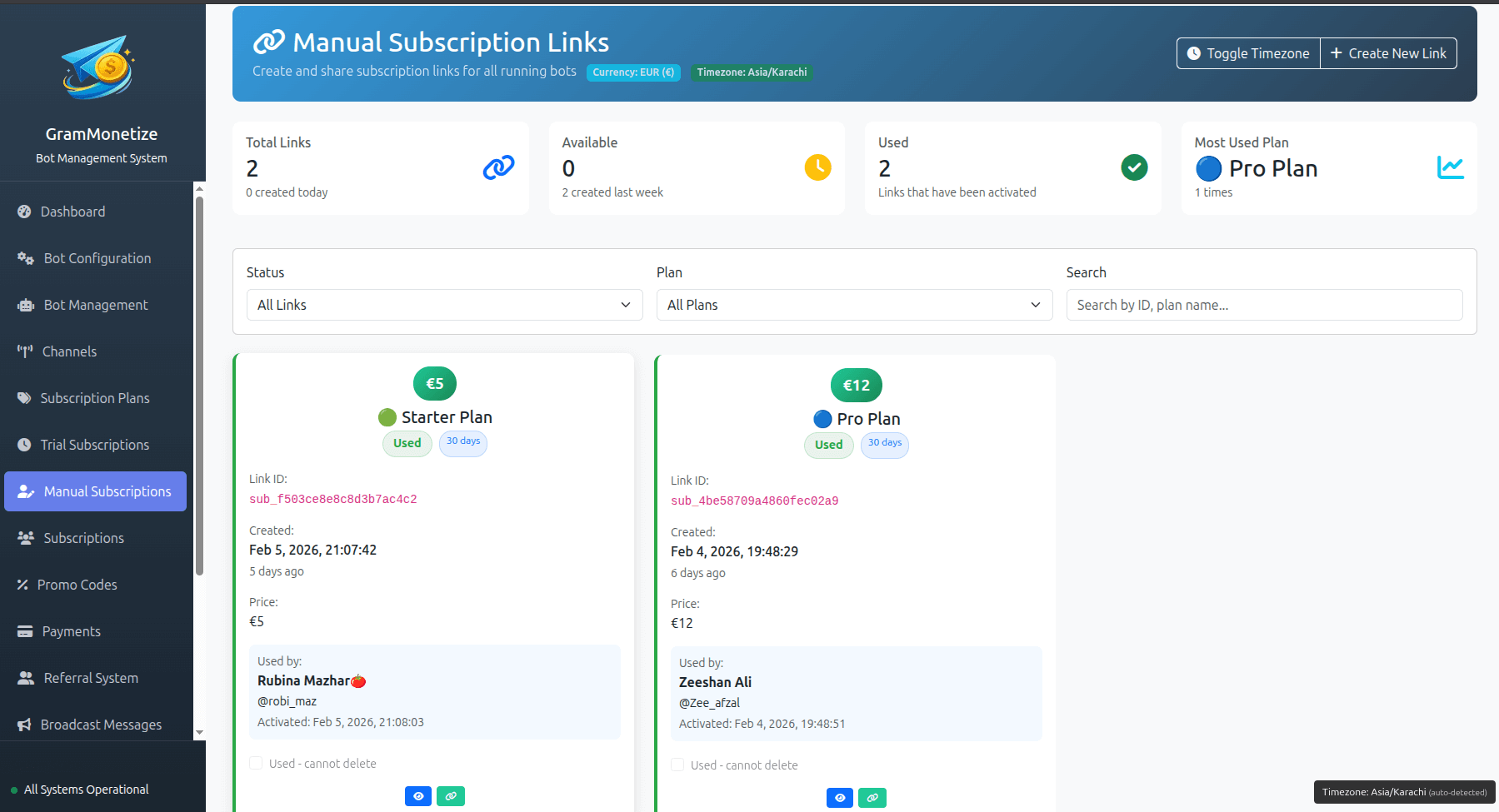
Manual subscriptions are single-use links designed specifically for users who pay via offline or alternative payment methods. Unlike trial subscriptions, each manual subscription link works only once and grants access for a specific number of days. Perfect for bank transfers, cash payments, cryptocurrency, or any other manual payment arrangement.
Single-Use Only
Each manual subscription link can be used exactly once. Perfect for individual customer payments.
Unlike Trials: Unlimited uses availableExtendable
If a user resubscribes during an active period, their subscription is automatically extended.
Auto-stacking days47
Active Manual Subs
12
Created Today
156
Expire This Month
8
Extensions Today
Manual Subscription vs Trial Subscription
- 🔹 Single-use only
- 🔹 For paid customers
- 🔹 Extendable (stackable days)
- 🔹 No conversion tracking
- 🔸 Limited or unlimited uses
- 🔸 Free evaluation period
- 🔸 Not extendable
- 🔸 Conversion tracking
Setup Process
Creating a manual subscription link is simple and fast. Each link is single-use and grants access for the exact number of days you specify.
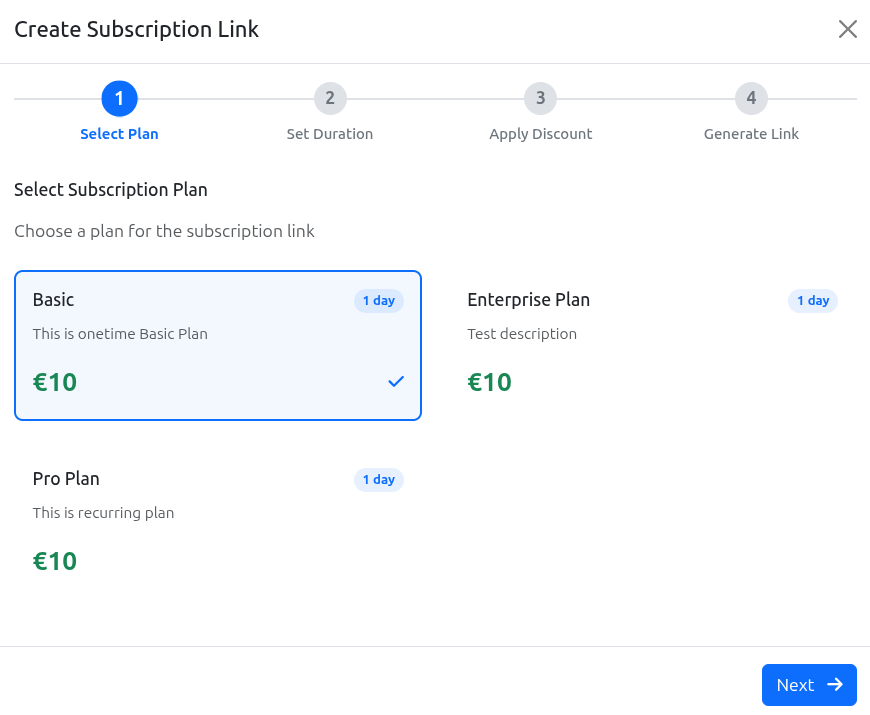
Quick Create
Generate a single-use link with default settings
Reuse Template
Create from existing manual subscription
⚠️ Important: Single-Use Only
Manual subscription links are designed for one-time use per customer. Once a user clicks the link and activates their subscription, the link becomes invalid and cannot be used again. This prevents unauthorized sharing and ensures each paid customer receives exactly one subscription.
User Management
Monitor all users who have activated manual subscriptions. Track their status, expiry dates, and payment history in one centralized view.
Active Manual Subscriptions
| User | Telegram ID | Plan | Started | Expires | Days Left | Payment Method | Status | Actions |
|---|---|---|---|---|---|---|---|---|
|
@sarah_trader
Sarah Johnson
|
987654321 |
Premium Monthly | Feb 15, 2024 | Mar 16, 2024 |
30 days
|
Crypto BTC-TX-3f8a2b9c | Active |
|
|
@michael_crypto
Michael Chen
|
456123789 |
Annual Premium | Jan 20, 2024 | Jan 19, 2025 |
339 days
|
Bank Transfer REF: WT-2024-0120 | Active |
|
|
@emily_trades
Emily Rodriguez
|
789321654 |
Standard Monthly | Feb 1, 2024 | Mar 1, 2024 |
15 days
|
Cash In-person payment | Active |
|
|
@david_invest
David Kim
|
159753486 |
Premium Monthly | Feb 10, 2024 | Feb 24, 2024 |
9 days
|
Crypto ETH-TX-7d4f9g2h | Active |
|
Manual Subscription Details
User Information
| Username: | @sarah_trader |
| Full Name: | Sarah Johnson |
| Telegram ID: | 987654321 |
| Joined: | Feb 15, 2024 14:23 UTC |
Subscription Details
| Subscription ID: | MAN-20240215-001 |
| Plan: | Premium Monthly ($19.99) |
| Duration: | 30 days |
| Expires: | Mar 16, 2024 14:23 UTC |
| Payment Method: | Cryptocurrency (Bitcoin) |
| Transaction ID: | BTC-TX-3f8a2b9c |
Expiry Control
Manual subscriptions automatically expire after the specified number of days. When a subscription expires, the user is automatically removed from all premium channels.
1. Active Period
User has access for X days
2. Expiry Warning
3-day warning notification
3. Expiry Date
Access revoked automatically
4. Removed
Kicked from premium channels
| User | Plan | Expiry Date | Days Left | Action |
|---|---|---|---|---|
| @david_invest | Premium Monthly | Feb 24, 2024 | 9 days | |
| @alice_crypto | Standard Monthly | Feb 26, 2024 | 11 days | |
| @robert_trader | Premium Monthly | Feb 28, 2024 | 13 days |
🤖 Automatic Expiry & Removal
When a manual subscription reaches its expiry date, GramMonetize automatically removes the user from all associated premium channels. No manual action required. The user receives a notification that their subscription has expired and they can resubscribe via a new manual link or automated payment.
Subscription Extensions
When a user with an active manual subscription purchases additional time, their subscription is automatically extended. Days are stacked onto their existing expiry date.
User purchases 30 days → Expires March 16, 2024
On March 1, purchases another 30 days
New expiry: March 16 + 30 days = April 15, 2024
✓ Days stacked, not resetExtension Calculator
Extensions always stack onto the existing expiry date. Users never lose unused days when they resubscribe.
Extension History - @sarah_trader
| Date | Action | Days Added | Previous Expiry | New Expiry | Payment Method |
|---|---|---|---|---|---|
| Feb 15, 2024 | Initial | +30 days | — | Mar 16, 2024 | Crypto (BTC) |
| Mar 1, 2024 | Extension | +30 days | Mar 16, 2024 | Apr 15, 2024 | Bank Transfer |
| Apr 10, 2024 | Extension | +30 days | Apr 15, 2024 | May 15, 2024 | Cash |
Bulk Extensions
Need to extend multiple users at once? Select users from the list and use the bulk extension tool.
Best Practices
Payment Tracking
- Always record payment method and reference
- Include transaction IDs for cryptocurrency payments
- Add notes about special payment arrangements
- Keep receipts for accounting purposes
Expiry Management
- Monitor the "Expiring Soon" list daily
- Contact users 3-5 days before expiry
- Offer renewal discounts for manual payments
- Set up automatic expiry notifications
Organization Tips
- Use descriptive customer references (name + payment method)
- Group manual subscriptions by payment method
- Export monthly reports for reconciliation
- Archive completed subscriptions monthly
What to Avoid
- Reusing single-use links for multiple customers
- Forgetting to record payment references
- Extending subscriptions without payment confirmation
- Deleting user records after expiry
Recommended Workflow for Manual Payments
- Step 1: Receive payment confirmation (bank transfer notification, crypto confirmation, cash received)
- Step 2: Create manual subscription link with exact duration and plan
- Step 3: Send the single-use link directly to the customer via Telegram DM or email
- Step 4: Customer clicks link and gains immediate access
- Step 5: Link expires immediately after use (cannot be reused)
- Step 6: Monitor expiry and send renewal reminders
- Step 7: For renewals, create new link - days automatically stack onto existing subscription
Frequently Asked Questions
| Feature | Manual Subscription | Trial Subscription |
|---|---|---|
| Purpose | Paid customers (offline payments) | Free evaluation |
| Usage Limit | Single-use only | Limited or unlimited |
| Extensions | Yes - stackable | No |
| Conversion Tracking | No (already paid) | Yes |
| Payment Required | Yes (offline) | No |
- User is immediately added to all channels associated with the plan
- Their subscription start date is set to the current time
- Expiry date is calculated as current time + X days
- The link becomes permanently invalid and cannot be used again
- User receives a welcome message with their expiry date
- The subscription appears in your active manual subscriptions list
If the user already has an active subscription for the same plan, the days are added to their existing expiry date.
Yes! In fact, this is the recommended approach. When a user resubscribes while their current subscription is still active:
- Create a new manual subscription link for the same user
- When they click it, the days are added to their current expiry date
- They don't lose any unused days from their current subscription
- The new link expires immediately after use
Yes! You can manually activate a subscription directly from the admin panel:
- Go to Manual Subscription → Direct Add
- Enter the user's Telegram username or ID
- Select the plan and duration
- Add payment details
- Click Activate Now
This is useful for in-person payments where the user is already with you, or for VIP customers where you want to grant immediate access without a link.
Since each manual link is single-use and hasn't been clicked yet, you have two options:
- Resend the existing link - The link is still valid until used. You can resend it from the subscription details page.
- Generate a new link - Delete the old link (it will expire immediately) and create a fresh single-use link for the user.
We recommend option #2 if you're unsure whether the link was compromised.
If you need to refund a manual subscription:
- Process the refund via your original payment method (bank transfer, crypto, cash)
- In GramMonetize, go to the user's subscription
- Click Cancel Subscription and select "Refunded" as the reason
- The user will be immediately removed from all premium channels
- Add a note about the refund for your records
The subscription will be marked as "Cancelled (Refunded)" in your history.
Yes! GramMonetize provides full export capabilities for manual subscriptions:
- CSV Export - For Excel, Google Sheets, or accounting software
- PDF Report - Printable summary with all manual subscriptions
- API Access - Integrate with your accounting systems
You can filter by date range, payment method, or plan before exporting. Perfect for monthly reconciliation and tax reporting.
You can set manual subscriptions from 1 to 3650 days (approximately 10 years).
Common durations:
- 📆 7 days - Weekly pass
- 📆 30 days - Monthly subscription
- 📆 90 days - Quarterly
- 📆 365 days - Annual
- 📆 3650 days - Lifetime access
Need longer than 10 years? Contact support for custom arrangements.
Related Documentation
Was this documentation helpful?
Your feedback helps us improve the documentation.