Subscription Management
Complete guide to managing all your subscribers in one place. View active subscriptions, track expiring soon, manage renewals, handle cancellations, and export subscriber data for analysis.
On this page
Subscription Overview
The Subscription dashboard is your central hub for managing all subscribers across every plan and payment method. Get a complete view of your subscription health, track expirations, handle cancellations, and export data for further analysis.
1,245
Active Subscriptions
+12% from last month89
Expiring Soon
Within 7 days342
Expired
Last 30 days56
Cancelled
This month$24,850
+8.2%4.2%
-0.8%95.8%
+1.2%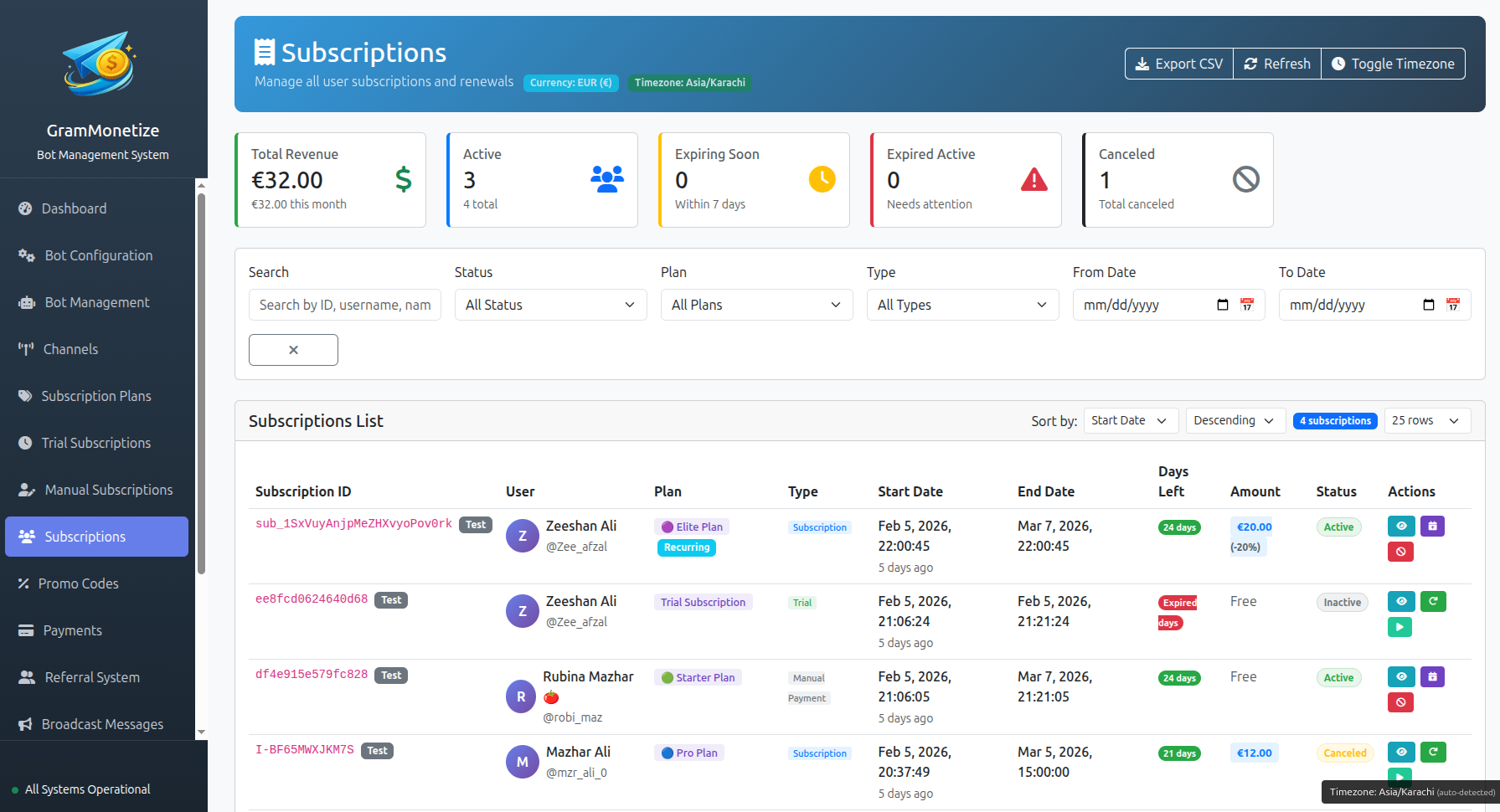
Active Subscriptions
View and manage all active subscribers in one comprehensive table. Filter by plan, payment method, or date range. Click on any subscriber to view detailed subscription information and take actions.
All Active Subscribers
|
|
Subscriber | Plan | Start Date | Expiry Date | Status | Payment | Amount | Actions |
|---|---|---|---|---|---|---|---|---|
|
|
@john_crypto
john.doe@email.com
ID: 123456789
|
Premium Monthly | Jan 15, 2024 | Feb 15, 2024 | Active | Stripe | $19.99 |
|
|
|
@sarah_trader
sarah.w@email.com
ID: 987654321
|
Annual Premium | Jan 1, 2024 | Dec 31, 2024 | Active | PayPal | $159.99 |
|
|
|
@michael_invest
mike.c@email.com
ID: 456789123
|
Standard Monthly | Feb 1, 2024 | Mar 1, 2024 | Active | Bank Transfer | $9.99 |
|
|
|
@emily_crypto
emily.r@email.com
ID: 159753486
|
Premium Monthly | Jan 28, 2024 | Feb 27, 2024 | Active | Crypto | $19.99 |
|
Subscriber Information
| Username: | @john_crypto |
| Full Name: | John Doe |
| Email: | john.doe@email.com |
| Telegram ID: | 123456789 |
| Joined: | Jan 15, 2024 10:23 UTC |
Subscription Information
| Subscription ID: | SUB-20240115-001 |
| Plan: | Premium Monthly ($19.99/month) |
| Billing Period: | Monthly (recurring) |
| Start Date: | Jan 15, 2024 |
| Expiry Date: | Feb 15, 2024 |
| Payment Method: | Stripe (•••• 4242) |
| Next Billing: | Feb 15, 2024 |
| Total Paid: | $19.99 |
Channel Access
Cancel Subscription Confirmation
Are you sure you want to cancel @john_crypto's subscription?
Filter Subscribers
Renewals & Expiry Management
Monitor upcoming renewals and manage expiring subscriptions. The system automatically handles recurring payments, but you can manually intervene when needed.
Upcoming Renewals (Next 30 Days)
123 renewals| Subscriber | Plan | Renewal Date | Amount | Payment Method | Status | Actions |
|---|---|---|---|---|---|---|
| @john_crypto | Premium Monthly | Feb 15, 2024 Tomorrow | $19.99 | Stripe | Scheduled | |
| @sarah_trader | Standard Monthly | Feb 18, 2024 | $9.99 | PayPal | Scheduled | |
| @michael_invest | Premium Monthly | Feb 20, 2024 | $19.99 | Bank Transfer | Manual Required |
Auto-Renewal Settings
Expiry Management
Track subscriptions expiring within the next 7 days and take proactive action to retain customers. This dedicated table shows all subscribers whose access will end soon.
|
|
Subscriber | Plan | Expiry Date | Days Left | Auto-Renew | Payment Method | Actions |
|---|---|---|---|---|---|---|---|
|
|
@david_invest
|
Premium Monthly | Feb 17, 2024 |
2 days
|
On | Stripe |
|
|
|
@lisa_crypto
|
Standard Monthly | Feb 18, 2024 |
3 days
|
On | PayPal |
|
|
|
@robert_trades
|
Premium Monthly | Feb 19, 2024 |
4 days
|
Off | Bank Transfer |
|
|
|
@emily_wallet
|
Annual Premium | Feb 22, 2024 |
7 days
|
On | Crypto |
|
Recently Expired (Last 30 Days)
342 expired| Subscriber | Plan | Expired On | Days Since Expiry | Previous Payment | Actions |
|---|---|---|---|---|---|
| @thomas_btc | Premium Monthly | Feb 1, 2024 | 15 days | Stripe | |
| @jessica_signals | Standard Monthly | Jan 28, 2024 | 19 days | PayPal |
Cancelled Subscriptions
56 this month| Subscriber | Plan | Cancelled On | Reason | Refund Status | Actions |
|---|---|---|---|---|---|
| @mark_eth | Annual Premium | Feb 14, 2024 | Too expensive | Refunded | |
| @anna_trader | Premium Monthly | Feb 10, 2024 | Not enough time | No Refund |
Export Reports
Export your subscription data in multiple formats for external analysis, accounting, or compliance requirements. Filter by date range, status, or plan before exporting.
CSV Export
Compatible with Excel, Google Sheets, and most accounting software
Excel Export
Formatted .xlsx file with multiple sheets and styling
PDF Report
Printable summary with charts and key metrics
Export Configuration
Recent Exports
| File Name | Format | Date Range | Generated | Size | Actions |
|---|---|---|---|---|---|
| subscriptions_2024_02_15 | CSV | Jan 1 - Jan 31, 2024 | Feb 15, 2024 10:23 | 2.4 MB | |
| active_subscribers_feb2024 | Excel | Feb 1 - Feb 15, 2024 | Feb 15, 2024 09:15 | 1.8 MB | |
| revenue_report_q1_2024 | Jan 1 - Mar 31, 2024 | Feb 14, 2024 16:42 | 856 KB |
Subscription Analytics
Visual insights into your subscription business. Track growth, retention, and revenue trends over time.
Subscription Growth (Last 6 Months)
Subscription Distribution by Plan
Frequently Asked Questions
Yes, you can cancel any subscription at any time.
To cancel a subscription:
- Find the subscriber in the Active Subscriptions table
- Click the X cancel button or open their details and click "Cancel Subscription"
- Confirm the cancellation
- Choose whether to offer a refund (optional)
The user will be immediately removed from premium channels and notified of the cancellation. Cancelled subscriptions appear in the "Cancelled" status table.
- Go to Subscription → Export Reports
- Select Custom range from the Date Range dropdown
- Choose your start and end dates
- Apply any additional filters (status, plan, payment method)
- Select your preferred export format (CSV, Excel, PDF)
- Click Generate Export
The export will be processed and available for download immediately. Large exports may take a few moments.
Expired
Natural end of subscription term. User didn't renew or payment failed. Can be resubscribed.
Cancelled
Manually stopped by admin or user. May be mid-term. Usually includes refund if requested.
Yes! You can schedule recurring exports.
Available schedules:
- Daily (end of day)
- Weekly (every Monday)
- Monthly (1st of month)
- Quarterly (Jan 1, Apr 1, Jul 1, Oct 1)
Exports can be automatically sent to your email or uploaded to cloud storage (Dropbox, Google Drive, OneDrive).
Use the filter panel above the subscribers table:
- Click the Filter button
- Select your desired Plan from dropdown
- Select Payment Method if needed
- Choose Status (Active, Expiring Soon, etc.)
- Set Date Range for subscription start/expiry
- Click Apply Filters
The table will instantly update to show only matching subscribers.
Yes, bulk extension is available.
- Go to the Expiring Soon table
- Check the checkbox next to each user you want to extend
- Click the Bulk Extend button
- Enter the number of days to add (e.g., 7, 14, 30)
- Add a reason/note (optional)
- Confirm the extension
All selected users will have their expiry dates extended by the specified number of days.
Related Documentation
Subscription Plans · Manual Subscription · Payment Providers · Broadcast Messages
Was this documentation helpful?
Your feedback helps us improve the documentation.