Subscription Plans Management
Complete guide to creating and managing subscription plans, setting up one-time or recurring payments, assigning promo codes, and comparing plans side by side.
On this page
Subscription Plans Overview
GramMonetize's flexible subscription plan system allows you to create multiple pricing tiers, set up one-time or recurring payments, and customize access levels for your Telegram channels. Design plans that match your business model and maximize revenue.
6
Active Plans
4
Recurring Plans
2
One-Time Plans
5
Promo Codes Active
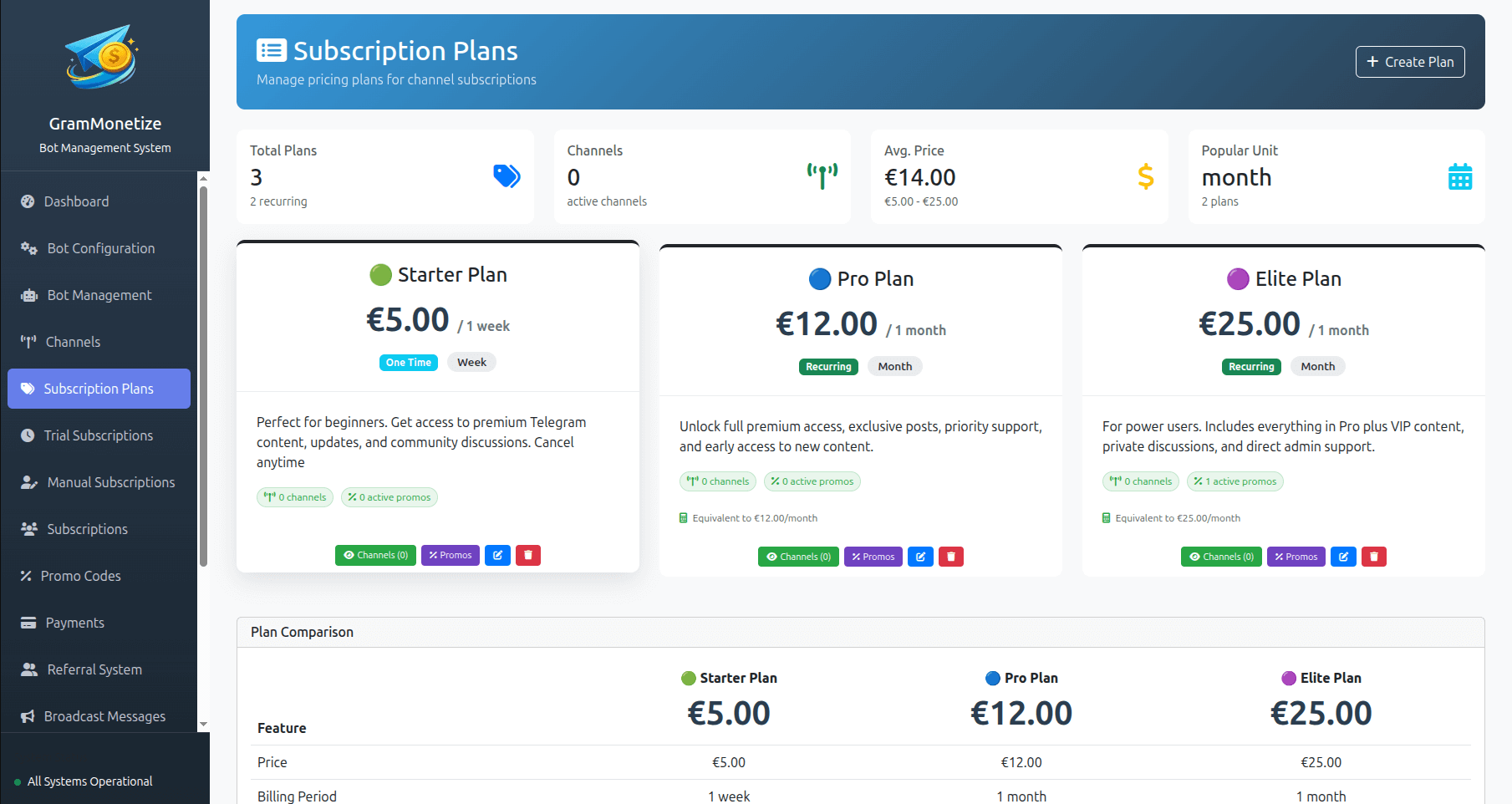
Creating Subscription Plans
Create flexible subscription plans tailored to your content and audience. Each plan can be configured with unique pricing, billing periods, and access permissions.
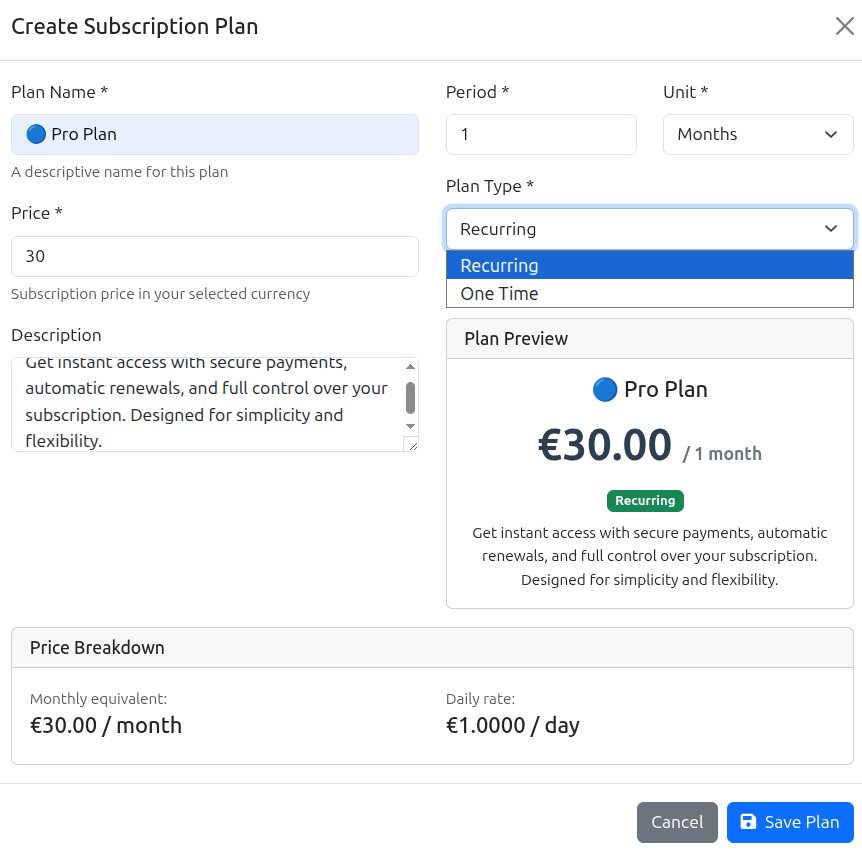
Plan Configuration Fields
| Field | Description | Example | Required |
|---|---|---|---|
| Plan Name | Display name shown to customers | Premium Monthly, Basic Lifetime | Yes |
| Plan ID | Unique identifier used in API and URLs | premium-monthly, basic-lifetime | Yes |
| Price | Amount charged for the plan | $9.99, $49.99, $199.99 | Yes |
| Currency | Currency for pricing (multi-currency support) | USD, EUR, GBP, JPY | Yes |
| Billing Period | One-time or recurring interval | One-time, Monthly, Yearly | Yes |
| Description | Features and benefits of the plan | Bullet list of included features | Yes |
| Channel Access | Which Telegram channels are included | @premium-chat, @signals | Optional |
| Trial Period | Free trial duration in days | 7 days, 14 days, 30 days | Optional |
| Promo Code | Attach promotional discount codes | SUMMER20, WELCOME10 | Optional |
Pro Tips for Plan Creation
- Use descriptive plan names that convey value (e.g., "Premium" not "Plan A")
- Include 5-7 key features in your description as bullet points
- Start with 3-4 plans (Basic, Standard, Premium) and expand based on demand
- Test your plan pricing with a small focus group before launching
Plan Types: One-Time vs Recurring
GramMonetize supports both one-time payment plans (lifetime access) and recurring subscription plans. Choose the model that best fits your content strategy and revenue goals.
Customers pay once and receive permanent access to your channels. Ideal for:
- Lifetime access offers
- Digital products and courses
- Founding member specials
- Event or webinar recordings
Configuration Example:
No recurring charges, higher upfront revenue, ideal for premium content
Customers are billed automatically at regular intervals. Ideal for:
- Ongoing content subscriptions
- Newsletter and daily updates
- Community access
- Predictable recurring revenue
Configuration Examples:
Available Billing Periods
Monthly
30-day cyclesQuarterly
90-day cyclesYearly
365-day cyclesCustom
7, 14, 45, 60 daysHow to Choose: One-Time vs Recurring
| Factor | One-Time | Recurring |
|---|---|---|
| Revenue Model | High upfront, flat long-term | Lower upfront, growing over time |
| Customer Commitment | Low (no ongoing payments) | Ongoing commitment required |
| Content Type | Static/evergreen content | Daily/weekly updates |
| Churn Risk | No churn (lifetime) | Monthly churn possible |
| Best For | Courses, guides, tools | News, signals, communities |
Pricing Strategies
Effective pricing is key to maximizing revenue. GramMonetize supports various pricing models to help you optimize your subscription business.
Standard Pricing
Simple, single-price model
Simple to understand, easy to compare. Best for straightforward offerings.
Tiered Pricing
Multiple plans with increasing value
Guide users toward your target plan. The "decoy effect" makes middle option most attractive.
Discount Strategy
Annual vs Monthly savings
Encourage longer commitments with annual discounts. Improves cash flow and reduces churn.
Limited Time & Launch Pricing
Early bird specials
Create urgency and reward early adopters. Great for launching new plans.
Revenue Impact Calculator
Plan Comparison
The Plan Comparison feature allows you to display your subscription plans side by side, helping customers make informed decisions and highlighting the value of higher-tier plans.
Plan Comparison View
| Features |
Basic
$9.99
/month
|
POPULAR
$19.99
/month
|
Premium
$39.99
/month
|
|---|---|---|---|
| Channels Access | 1 channel | 3 channels | All channels (8+) |
| Message History | 7 days | 30 days | Unlimited |
| Support | Priority Email | 24/7 Priority + Telegram | |
| Analytics | Basic | Advanced | |
| Promo Code Eligible | |||
| Trial Period | 3 days | 7 days | 14 days |
Enable Plan Comparison
- Navigate to Subscription Plans → Plan Comparison
- Click Create New Comparison
- Select 2-4 plans to include in the comparison
- Arrange plans in desired order (left to right)
- Choose which features to highlight in the table
- Mark one plan as "Popular" or "Best Value"
- Click Publish Comparison
Comparison Best Practices
- Include 3 plans (Goldilocks principle: good, better, best)
- Highlight the middle plan as "Popular" or "Recommended"
- Use checkmarks (✓) and x-marks (✗) for binary features
- Include annual pricing options for comparison
- Show percentage savings for higher tiers
- Update comparisons when plans change
Live Comparison Widget
The comparison table can be embedded on your landing pages, pricing page, or directly in Telegram using the /plans command.
/compare premium basic - Compare specific plans
Managing Subscription Plans
Easily edit, archive, or delete plans as your business evolves. GramMonetize provides flexible plan management tools to maintain your subscription offerings.
Edit Plan
Modify plan details, pricing, description, and channel access.
- Plan name & description
- Price (with caution notice)
- Channel assignments
- Promo code links
- Trial period settings
Archive / Deactivate
Remove plan from public view while retaining existing subscribers.
- Plan hidden from new users
- Current subscribers continue
- No new signups allowed
- Can be reactivated anytime
Delete Plan
Permanently remove plan from the system.
- Cannot delete plans with active subscribers
- Must migrate users or cancel subscriptions first
- Permanent action (cannot be undone)
Use "Archive" instead if you have active subscribers.
Plan Status Toggles
Bulk Plan Operations
Select multiple plans to perform bulk actions:
Important: Editing Plans with Active Subscribers
✓ Safe to edit:
- Plan description and features
- Channel assignments
- Trial period settings
- Promo code eligibility
⚠️ Proceed with caution:
- Price changes (notify existing subscribers)
- Changing from one-time to recurring
- Plan name/ID changes
For major changes, consider creating a new plan and grandfathering existing users.
Frequently Asked Questions
- 3-5 active plans displayed to customers at any time
- Unlimited archived plans for historical records
- Test plans can be created and deleted as needed
Technically yes, but not recommended if you have active subscribers on the plan.
Recommended approach:
- Create a new recurring plan with the desired pricing
- Archive the existing one-time plan (hide from new users)
- Honor existing one-time subscribers with lifetime access
- Offer existing users a migration path with special pricing
There are two ways to assign promo codes to plans:
- Navigate to the plan edit screen
- Find the "Promo Code Assignment" dropdown
- Select an existing promo code
- Save the plan
- Go to Promo Code → Manage Codes
- Edit a specific promo code
- In "Applicable Plans," select target plans
- Save changes
One promo code can be assigned to multiple plans, and one plan can have multiple promo codes.
You cannot delete a plan that has active subscribers. This is a safety measure to prevent accidental disruption of service.
To remove a plan with active subscribers:
- Archive the plan instead of deleting it. This hides it from new users but existing subscribers continue.
- Migrate subscribers to another plan using bulk operations.
- Wait for all subscriptions to expire or be cancelled.
- Once subscriber count reaches zero, you can delete the plan.
Yes! GramMonetize supports multi-currency pricing. For each plan, you can:
- Set a base currency (usually USD)
- Add localized pricing for other currencies
- Set exchange rates manually or enable auto-conversion
Customers will see prices in their local currency based on their IP address or Telegram language settings.
Premium Plan: $19.99 USD
→ €18.50 EUR
→ £16.00 GBP
→ ¥2,800 JPY
GramMonetize supports flexible pricing models including "Pay What You Want" through the Custom Price plan type:
- Create a new plan
- Select "Custom Price" from the pricing model dropdown
- Set minimum and maximum price limits
- Add a suggested price (optional)
- Configure suggested amounts (e.g., $5, $10, $20)
This is perfect for charity campaigns, community support, or testing optimal price points.
Yes! Each subscription plan has its own analytics dashboard showing:
- Active subscribers - Current count and trend
- MRR (Monthly Recurring Revenue) - Per plan breakdown
- Churn rate - Percentage of cancellations
- Conversion rate - Trial to paid
- Lifetime Value (LTV) - Average revenue per subscriber
- Payment method breakdown - How subscribers pay
Navigate to Subscription → Analytics and filter by specific plan for detailed insights.
| Action | Visibility | Existing Subscribers | New Signups | Reversible |
|---|---|---|---|---|
| Deactivate | Hidden from public | Continue unaffected | ❌ Not allowed | ✅ Yes |
| Archive | Hidden + moved to archive section | Continue unaffected | ❌ Not allowed | ✅ Yes |
| Delete | Removed completely | ⚠️ Only if zero | ❌ Not allowed | ❌ No |
For most cases, Archive is preferred as it keeps your active plans list clean while preserving data.
Looking to create promo codes?
Promo codes are managed in the Promo Code section. After creating promo codes, you can assign them to specific subscription plans here.
Was this documentation helpful?
Your feedback helps us improve the documentation.