Trial Subscription Management
Complete guide to creating trial subscription links with customizable usage limits, expiry dates, and real-time monitoring. Convert free users into paying customers.
On this page
Trial Subscription Overview
GramMonetize's trial subscription system allows you to create custom trial links in minutes. Perfect for influencer partnerships, limited-time promotions, or testing your subscription funnel. Set usage limits, expiry dates, or create unlimited trials for special campaigns.
8
Active Trials
247
Trial Users
32%
Conversion Rate
5
Expiring Soon
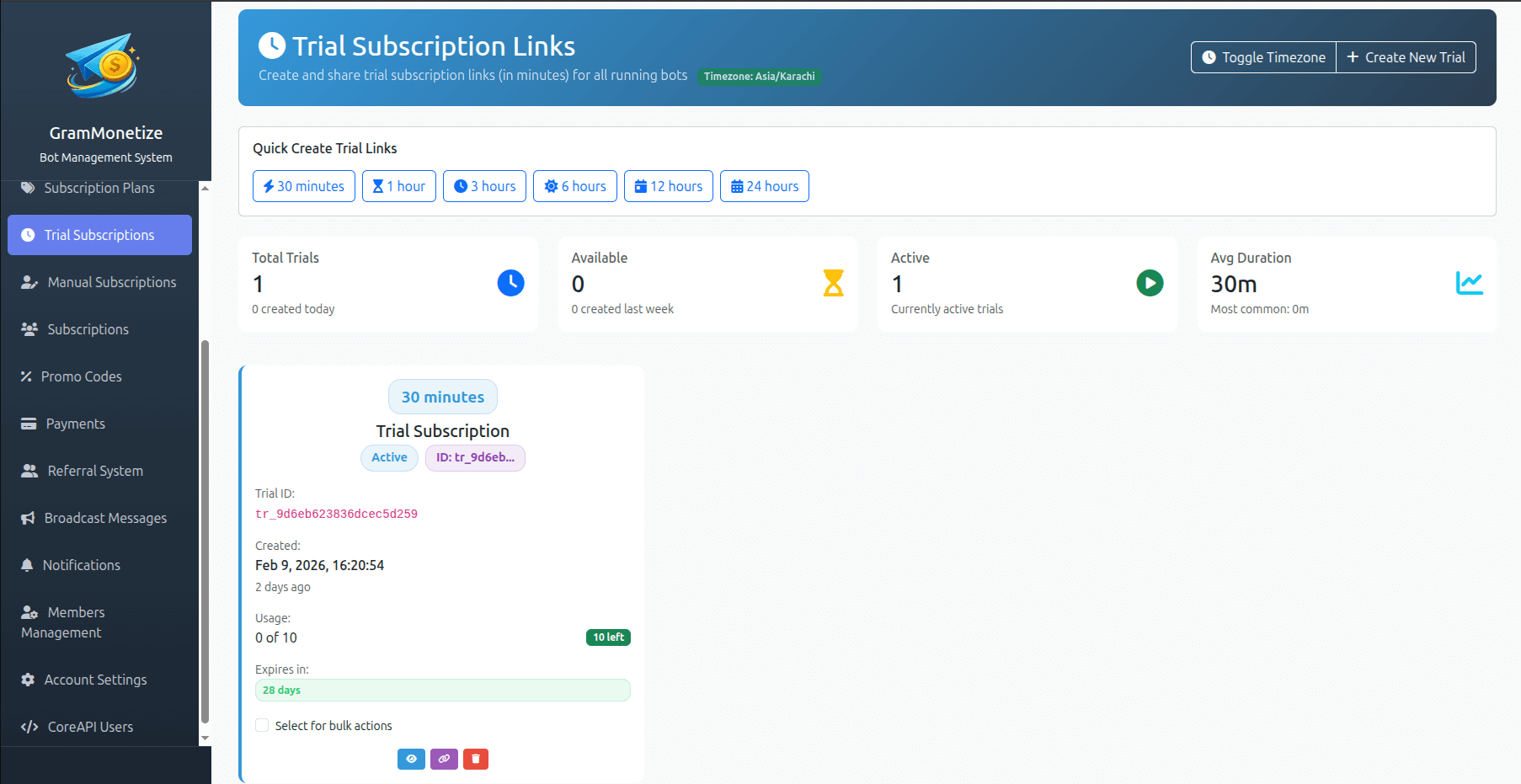
Creating Trial Links
Create customized trial subscription links in minutes. Each trial link can be configured with specific limits, expiry dates, and target subscription plans.
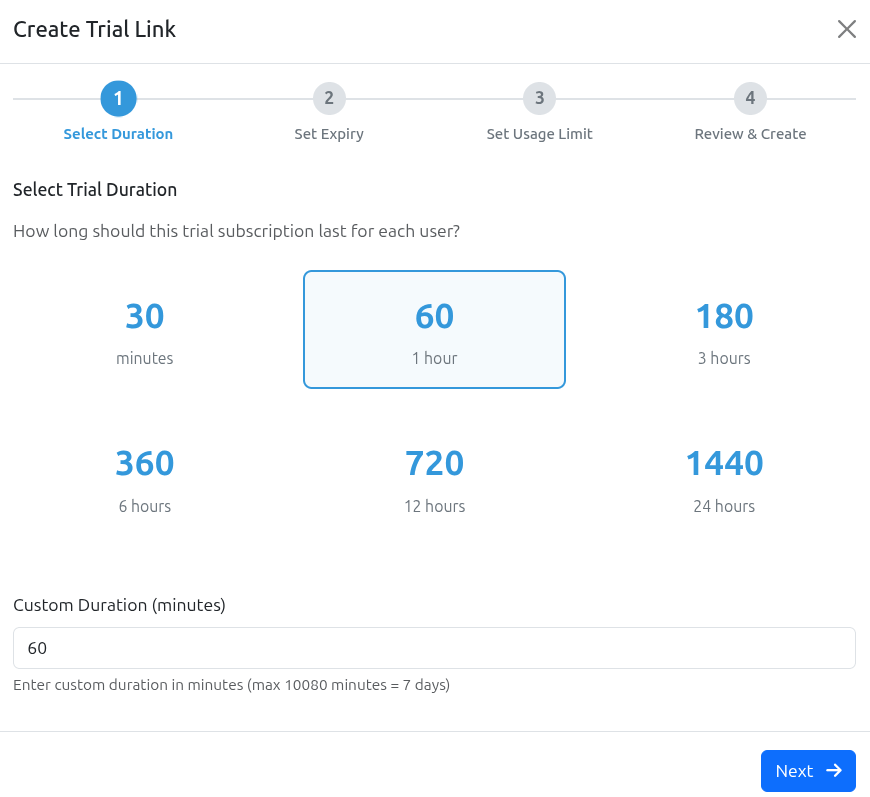
Trial Link Configuration Options
| Configuration | Options | Use Case |
|---|---|---|
| Duration | 3, 7, 14, 30 days or custom | 7-day trials for premium content, 30-day for annual plans |
| Usage Limit | Limited (1-1000+), Unlimited | Limited for exclusive promos, Unlimited for public landing pages |
| Expiry Date | Specific date, No expiry | Campaign-specific trials, Evergreen content |
| Target Plan | Any active subscription plan | Test different price points, promote specific plans |
| Welcome Message | Custom message, Default template | Branded onboarding, campaign-specific messaging |
Usage Limits & Expiry Dates
Control exactly how your trial links are used with flexible limit settings. From exclusive 1-use links to unlimited public trials, GramMonetize gives you complete control.
Limited Usage
Set a maximum number of redemptions. Perfect for:
- Influencer promo codes (100-500 uses)
- Early bird specials (first 50 users)
- Beta testing (limited slots)
- Partnership campaigns
Unlimited Usage
No redemption cap. Perfect for:
- Public landing pages
- Welcome email sequences
- Default trial offering
- Social media links
Fixed Expiry Date
Link expires on a specific date regardless of when it was claimed.
Best for: Campaigns with hard end dates, seasonal promotions
No Expiry
Link never expires (still respects usage limits if set).
Best for: Evergreen content, permanent offers, affiliate programs
Common Usage Limit Scenarios
Single-Use Links
Unique links for VIPs, contest winners, personal invitations
trial/vip-john-doe-7d
Influencer Campaigns
Limited codes for social media promotions
trial/techreviewer-summer
Public Trials
Website landing pages, email signups
trial/get-started-14d
Trial Link Status Indicators
Monitoring Trial Usage
Track every trial redemption in real-time. Monitor usage metrics, user details, and conversion potential from a single dashboard.
Active Trial Links
| Trial Name | Link / ID | Plan | Usage | Expiry | Status | Actions |
|---|---|---|---|---|---|---|
| Influencer - @techreviewer Created: Feb 1, 2024 |
trial/s7f8d2k9
|
Premium Monthly |
45
/
100
|
Dec 31, 2024 | Active |
|
| Summer Launch Promo Created: Jan 15, 2024 |
trial/summer24
|
Standard Monthly |
247
/
∞
Unlimited
|
No expiry | Active |
|
| Partner - CryptoSignals Created: Dec 10, 2023 |
trial/crypto50
|
Annual Premium |
50
/
50
|
Mar 31, 2024 | Depleted |
|
| Holiday Special 2023 Created: Nov 15, 2023 |
trial/holiday23
|
Premium Monthly |
328
/
500
|
Jan 15, 2024 | Expired |
|
Users Who Joined via Trial Link
| User | Telegram ID | Joined | Trial Ends | Status | Converted | Actions |
|---|---|---|---|---|---|---|
|
@john_crypto
John D.
|
123456789 |
Feb 10, 2024 | Feb 17, 2024 | Active | Pending | |
|
@sarah_trader
Sarah W.
|
987654321 |
Feb 5, 2024 | Feb 12, 2024 | Active | Converted ✓ | |
|
@mike_invest
Mike T.
|
456789123 |
Jan 28, 2024 | Feb 4, 2024 | Expired | Lost |
Trial Redemption Trend
Conversion by Trial Source
Conversion Tracking
Track how many trial users convert to paid subscribers and measure the ROI of your trial campaigns.
32%
Overall Conversion
+5% vs last month14.3
Days to Convert
Average from trial start$28.50
Avg. LTV
Converted trial users7.2%
Churn Rate
30-day post conversionTrial to Paid Conversion Funnel
Drop-off Points
- Day 1-3: 21% drop
- Day 4-7: 22% drop
- Conversion: 68% no-show
Send day 3 reminder to improve retention
A/B Test Your Trial Offers
Create multiple trial links with different durations and compare conversion rates:
Best Practices
Trial Duration Optimization
- 7-14 days is the sweet spot for most Telegram channels
- Longer trials (30d) for expensive annual plans
- Shorter trials (3-5d) for low-ticket items
- Test different durations with A/B testing
Conversion Optimization
- Send reminder emails at Day 3 and Day 1 before expiry
- Offer limited-time discount for trial users
- Highlight features they'll lose after trial
- Make conversion frictionless (saved payment methods)
Campaign Management
- Use descriptive trial names for easy tracking
- Set expiry dates for time-sensitive campaigns
- Monitor usage limits and top up if needed
- Archive expired trials for clean dashboard
What to Avoid
- Unlimited trials without conversion path
- No reminder emails before expiry
- Too many trial options (decision paralysis)
- Forgetting to delete unused trial links
Pro Tips for Higher Conversion
"Only 50 trial spots remaining" increases urgency
"Join 1,200+ trial users" builds trust
Welcome message with quick-start guide
Frequently Asked Questions
Yes, absolutely! You can create trial links with:
- Unlimited usage + No expiry - Perfect for evergreen content and permanent offers
- Unlimited usage + Fixed expiry - Great for time-limited campaigns
- Limited usage + No expiry - Exclusive links that never expire but have cap
Simply select "Unlimited usage" from the Usage Limit dropdown and "No expiry" from the Expiry Date dropdown when creating your trial link.
Yes, you can delete trial links anytime.
When you delete a trial link:
- The link immediately stops working - no new users can redeem it
- Existing trial users are not affected - they continue their trial
- The link is permanently removed from your dashboard
- This action cannot be undone (but you can recreate the link)
You can edit the following fields after a trial link is created:
- ✓ Trial Name (internal reference)
- ✓ Welcome Message
- ✓ Conversion Actions & Reminder Schedule
- ✓ Status (Active/Inactive toggle)
For security reasons, you cannot edit:
- ✗ Usage Limit (increase only - can't decrease)
- ✗ Target Plan
- ✗ Trial Duration
- ✗ The actual trial link URL
If you need to change these, create a new trial link and archive the old one.
When a user's trial period ends:
- They are automatically removed from all premium channels
- They receive a notification that their trial has ended
- If configured, they receive a conversion offer
- Their user status changes from "Trial" to "Expired"
- They can still subscribe to a paid plan to regain access
You can customize the expiry notification and offer in the trial link settings.
By default, GramMonetize prevents users from redeeming multiple trials to the same plan. Our system checks:
- Has this user ever had a trial for this specific plan?
- Has this user ever been a paid subscriber to this plan?
However, you can:
- Allow multiple trials per user (configure in Settings → Trial Rules)
- Create trials for different plans (user can try each plan once)
- Manually override for specific users (Contact Support)
Trial users are tracked separately from paid subscribers:
| Metric | Includes Trials? |
|---|---|
| Total Subscriptions | Separate count |
| MRR (Monthly Recurring Revenue) | ❌ No |
| Active Users | ✓ Yes (filterable) |
| Churn Rate | ❌ No (paid only) |
| Conversion Rate | ✓ Yes (trial → paid) |
You can view trial-specific metrics in the Trial Analytics dashboard.
Yes, absolutely! Each trial link is tied to a specific subscription plan, and you can set different trial durations per link.
For example:
- Basic Plan → 7-day trial
- Premium Plan → 14-day trial
- Annual Plan → 30-day trial
This allows you to give longer evaluation periods for higher-priced plans, which often leads to better conversion rates.
Related Documentation
Are you sure you want to delete this trial link?
Trial: "Influencer - @techreviewer" · Uses: 45/100 · Expires: Dec 31, 2024
Was this documentation helpful?
Your feedback helps us improve the documentation.