Payment Providers
Complete guide to configuring payment providers in GramMonetize. Currently supporting Stripe and PayPal with multi-credential support, round-robin load balancing, sandbox testing, and webhook integration.
On this page
Payment Providers Overview
GramMonetize currently supports Stripe and PayPal as automated payment processors, with Manual Payments for bank transfers, crypto, and other offline methods. Additional providers coming soon.
Stripe
Active
2 credentialsPayPal
Active
1 credentialManual
Active
Bank, Crypto, CashComing Soon
2024 Q3
Cryptocurrency, Apple Pay, Google Pay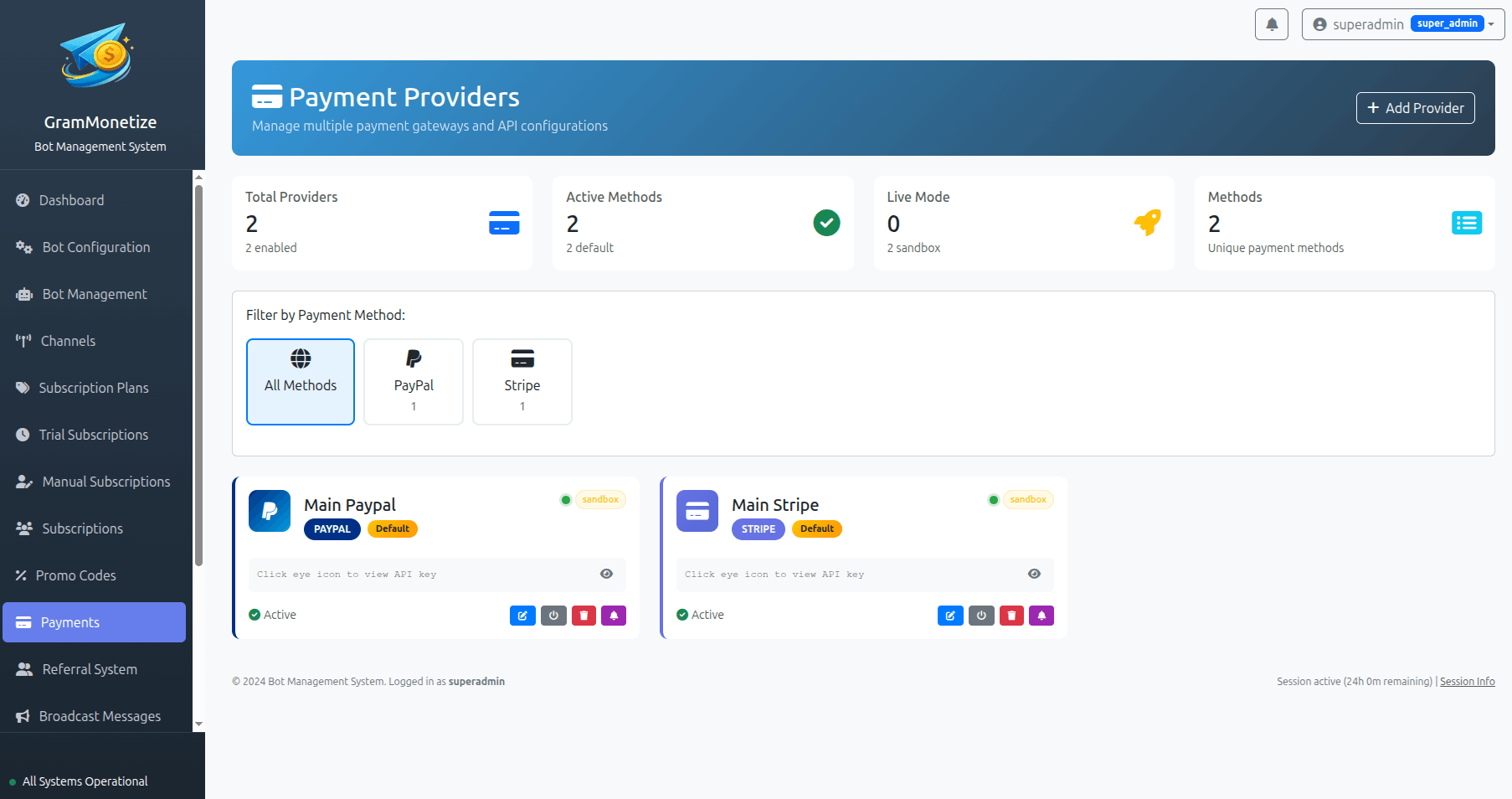
Stripe Integration
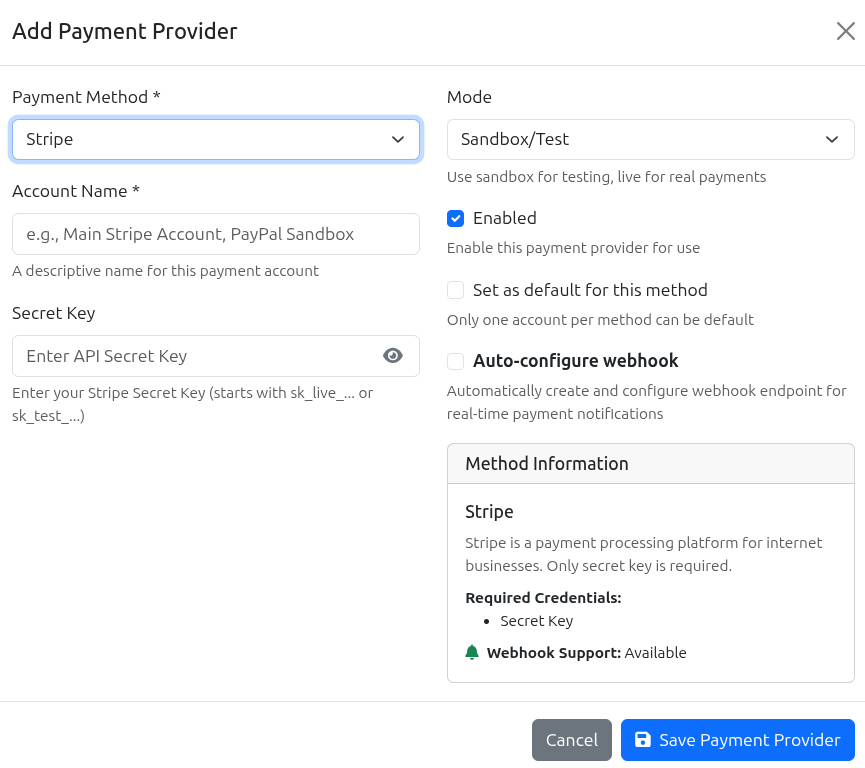
Accept credit card payments instantly with Stripe. Support for one-time payments, recurring subscriptions, and multiple currencies.
Stripe Webhook Events
Configure the following webhook events in your Stripe Dashboard to enable automatic payment processing:
| Event Type | Description | Required |
|---|---|---|
checkout.session.completed |
Successful one-time payment | Yes |
invoice.paid |
Recurring subscription payment succeeded | Yes |
invoice.payment_failed |
Recurring payment failed | Yes |
customer.subscription.updated |
Subscription changes (upgrade/downgrade) | Recommended |
customer.subscription.deleted |
Subscription cancelled | Recommended |
PayPal Setup
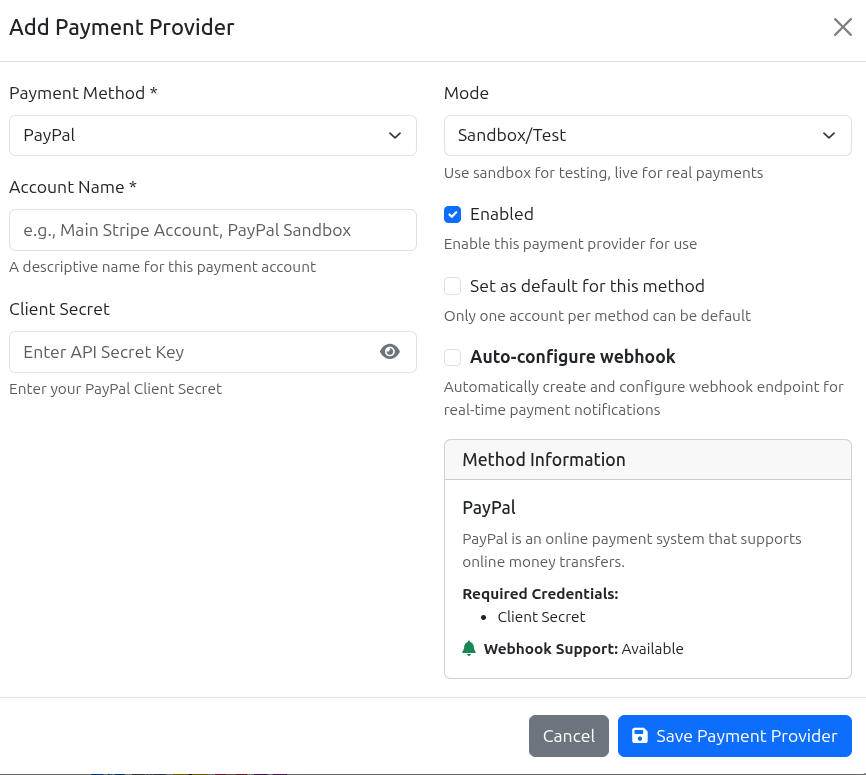
Accept payments via PayPal, including PayPal balance, credit cards, and bank accounts. Support for both one-time and recurring subscriptions.
Manual Payments
Accept payments via bank transfer, cryptocurrency, cash, or any other offline method. Manual payments are processed through the Manual Subscription system.
Manual Payment Configuration
Bank Transfer Details
Cryptocurrency Wallets
Multiple Credentials & Round Robin
GramMonetize supports adding multiple credentials for the same payment provider. This is perfect for high-volume businesses, multi-region operations, or separating test and live environments.
Round robin is a load balancing method that distributes payment traffic evenly across multiple credentials.
How it works:
- Each incoming payment request is assigned to the next available credential in sequence
- The system cycles through all active credentials evenly
- If a credential fails or is deactivated, it's automatically skipped
- When a new credential is added, it joins the rotation immediately
High Availability
If one Stripe account hits rate limits or has issues, others automatically take over. No downtime.
Scale Beyond Limits
Stripe and PayPal have transaction limits. Multiple credentials let you process more payments.
Multi-Region Support
Use different credentials for different countries/currencies to optimize conversion.
A/B Testing
Test different payment gateway configurations by running them side by side.
Stripe Credentials (Round-Robin Active)
| Name | Mode | Publishable Key | Webhook | Status | Actions |
|---|---|---|---|---|---|
| Stripe Business US | Live | pk_live_••••••4XpK |
✓ Verified | Active |
|
| Stripe Business EU | Live | pk_live_••••••8HjK |
✓ Verified | Active |
|
| Stripe Test Account | Test | pk_test_••••••3FgH |
Not Configured | Deactivated |
|
PayPal Credentials (Round-Robin Active)
| Name | Mode | Client ID | Webhook | Status | Actions |
|---|---|---|---|---|---|
| PayPal Business US | Live | AfQx••••••KpLm |
⚠ Pending | Active |
|
| PayPal Business EU | Sandbox | AbCd••••••XyZ |
✓ Verified | Test Mode |
|
Testing Mode
Test your payment integration thoroughly before going live. GramMonetize supports sandbox/test credentials for both Stripe and PayPal.
4242 4242 4242 4242
5555 5555 5555 4444
4000 0025 0000 3155
4000 0000 0000 0002
sb-abc123@personal.example.com
Test@1234
You are currently in TEST MODE
No real payments will be processed. Use test card numbers and sandbox accounts to verify your integration.
Pre-Launch Testing Checklist
Frequently Asked Questions
Yes! GramMonetize fully supports multiple credentials for the same payment provider.
This is useful for:
- High-volume businesses that exceed single-account transaction limits
- Businesses operating in multiple countries/currencies
- Separating test/sandbox credentials from live credentials
- Load balancing payments across different accounts
The system automatically distributes payments using round-robin load balancing.
Round robin distributes payment requests sequentially across all active credentials.
Example with 3 Stripe accounts:
- Payment #1 → Stripe Account A
- Payment #2 → Stripe Account B
- Payment #3 → Stripe Account C
- Payment #4 → Stripe Account A (cycles back)
- Payment #5 → Stripe Account B
- And so on...
If any credential is deactivated or fails, it's automatically removed from the rotation until reactivated.
Yes, absolutely. Each payment credential can be individually deactivated:
- Find the credential in the payment providers table
- Click the Pause button
- The credential is immediately removed from round-robin rotation
- No new payments will be processed through this credential
- Existing subscriptions continue to work normally
To reactivate, simply click the Play button. All settings are preserved.
Stripe Webhook URL:
https://api.grammonetize.com/webhooks/stripe
PayPal Webhook URL:
https://api.grammonetize.com/webhooks/paypal
Required Events:
- Payment success/failure
- Subscription creation/cancellation
- Invoice paid/failed
Webhooks are essential for automatic subscription management and should be configured before going live.
GramMonetize supports sandbox/test environments for both Stripe and PayPal:
Stripe Test Mode:
- Switch to Test Mode in your Stripe credential settings
- Use test publishable/secret keys from Stripe Dashboard
- Use test card numbers (4242 4242 4242 4242 for success)
- Configure test webhook endpoints
PayPal Sandbox:
- Switch to Sandbox mode in PayPal credential settings
- Use sandbox Client ID and Secret from PayPal Developer Dashboard
- Use sandbox test buyer accounts
Test credentials work in isolated environments and never process real payments.
We're actively working on integrating additional payment providers:
- Cryptocurrency (BTC, ETH, USDT) - Q3 2024
- Apple Pay - Q3 2024
- Google Pay - Q3 2024
- SEPA Bank Transfer - Q4 2024
- Alipay - Q1 2025
- WeChat Pay - Q1 2025
Want to request a specific provider? Contact our support team.
Related Documentation
Subscription Management · Manual Subscriptions · Bot Configuration
Was this documentation helpful?
Your feedback helps us improve the documentation.